


Microsoft’s April 2026 Windows updates have created a frustrating problem for some users who depend on third-party backup tools to browse, mount, or restore disk images. After installing Windows updates released on or after April 14, 2026, certain backup applications that rely on the psmounterex.sys kernel driver may fail when they try to mount or manage backup image files.
The problem is not simply a broken backup feature. It is tied to Microsoft’s vulnerable driver blocklist, a Windows security feature that prevents known vulnerable kernel drivers from loading. In this case, Windows Code Integrity enforcement can block vulnerable versions of psmounterex.sys, a driver associated with backup image mounting.
That leaves users in an awkward spot. A backup image may still exist. Full image backups may still be created. But when the user needs to mount the image as a virtual drive, browse files inside it, or restore selected data, the operation can fail.
Some online discussions have pointed to a registry-based workaround that disables the Microsoft vulnerable driver blocklist. That may get affected software working again in some situations, but it also reduces a security protection that Microsoft deliberately enabled. For home users, IT admins, and small businesses, the better question is not just whether the workaround works. It is whether using it is worth the risk.
What Changed in Windows 11
The affected Windows updates include KB5083769, released on April 14, 2026, and the later KB5083631 preview update from April 30, 2026. Microsoft says Windows updates released on or after April 14, 2026 include security hardening that blocks certain third-party drivers with known vulnerabilities.
The driver drawing attention here is psmounterex.sys. Backup applications can use this type of kernel-level driver to mount disk image files as virtual drives. That is the feature many users rely on when they want to open a backup image, browse its contents in File Explorer, pull out a few files, or inspect a saved system state without performing a full restore.
When Windows blocks the driver, the failure may show up in several ways. A backup application may fail to mount an image. Browsing or restoring from an image may time out. In some cases, users may see VSS-related errors or Code Integrity events in Windows Event Viewer that indicate psmounterex.sys was blocked from loading.
That distinction matters. A user may assume the backup itself is corrupt, but the actual issue may be that Windows refuses to load the driver needed to expose the image as a mounted volume. In practical terms, the backup file and the mounting pathway are separate pieces of the workflow.
Microsoft’s support guidance says full image backup creation may still succeed, while image-mount operations fail. That means affected users should avoid panic-deleting backup sets or assuming their stored images are useless. The immediate problem may be access through a blocked driver, not necessarily the integrity of the image file.
Why psmounterex.sys Is Being Blocked
Microsoft’s vulnerable driver blocklist exists because kernel drivers have unusually high privileges. A flawed driver can become a path for privilege escalation, tampering, or other attacks. Even if a driver belongs to legitimate software, a known vulnerability can make it useful to attackers.
The psmounterex.sys issue is tied to CVE-2023-43896, a vulnerability associated with Macrium Reflect’s image mounting driver. Public vulnerability information describes the issue as affecting older versions of Macrium Reflect and involving the driver used to mount backup images as virtual drives.
That history helps explain why the Windows behavior feels harsh but not random. Microsoft is not blocking a normal user-mode helper app. It is blocking vulnerable versions of a kernel-level driver that Windows considers unsafe to load when the vulnerable driver blocklist is enabled.
For backup software users, this is a reminder of how much trust imaging tools require. A disk imaging application often needs deep system access to snapshot volumes, interact with VSS, mount images, and prepare recovery media. Those capabilities are the reason the software is useful, but they also make driver quality and update status important.
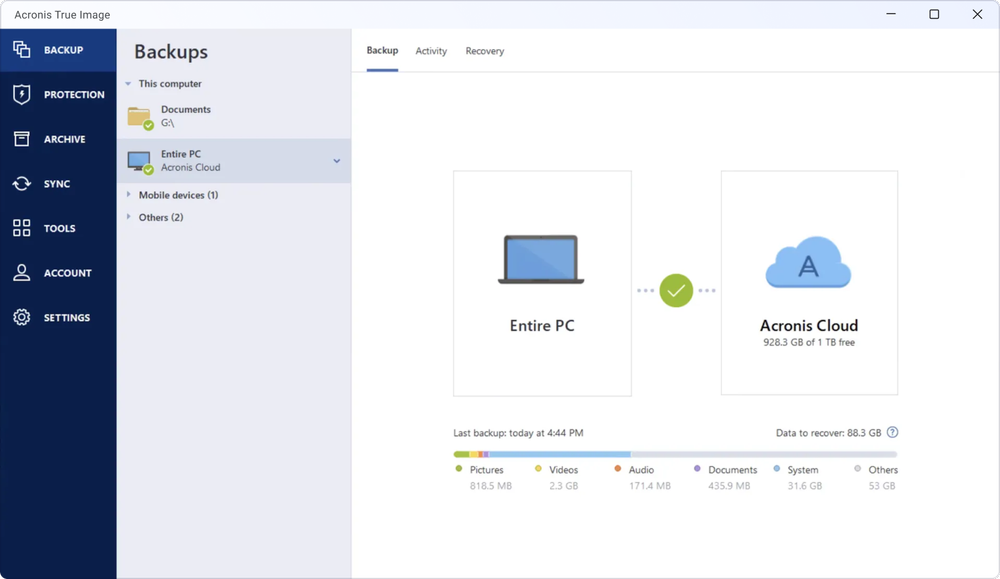
Acronis True Image backup software
Acronis True Image is relevant for readers comparing Windows backup tools because it supports full-image backups, local backup targets, cloud options, and recovery workflows. Readers should still verify current Windows 11 compatibility and test restores before relying on any backup app.
If you are choosing backup software for a Windows 11 PC today, image creation is only part of the buying decision. You also need to consider how quickly the vendor responds to Windows security changes, whether recovery media is easy to build, how image mounting works, and whether the product has a track record of keeping kernel components current.
The Registry Workaround and Its Tradeoff
Some community posts have circulated a registry workaround for affected systems. The general idea is to disable the Microsoft vulnerable driver blocklist by changing the VulnerableDriverBlocklistEnable value under the Windows Code Integrity configuration area of the registry, then restarting the PC.
That setting is real, and the vulnerable driver blocklist can also be controlled through Windows Security on some Windows versions and configurations. The important point is that disabling it is not a targeted fix for one backup program. It turns off a broader Windows protection designed to stop known vulnerable drivers from loading.
That is why the workaround should be treated as a temporary compatibility measure, not a normal fix. If someone disables the blocklist to recover a file from a backup image, they should understand that the system is operating with reduced protection during that window. The safer approach is to re-enable the blocklist afterward and restart again.
For most users, changing this registry value should not be the first response. Registry edits can affect system behavior, and this one specifically changes a security control. If the PC is used for work, managed by an employer, enrolled in Intune, protected by enterprise security policy, or used to handle sensitive files, disabling the blocklist may also conflict with organizational requirements.
There is also a practical support issue. If a vendor is already preparing an updated version of the backup application, turning off Windows security controls may leave the machine in a weaker state when a cleaner fix is simply to update the application. Microsoft’s guidance is that applications depending on this driver will continue to experience failures until they are updated to a newer version that includes the required protections.
What Affected Users Should Check First
Before using any registry workaround, confirm that this is actually the problem. If a backup image fails to mount after the April 2026 Windows updates, check whether the backup application reports a driver load failure, mount failure, VSS timeout, or image browsing error.
Windows Event Viewer can provide a clearer clue. Microsoft says users and administrators can check the Code Integrity Operational log for Event ID 3077. That event indicates a driver was blocked in enforcement mode. If the event names psmounterex.sys, the failure is likely tied to the vulnerable driver blocklist rather than a generic backup problem.
It is also worth checking the backup vendor’s update channel. If you are using Macrium Reflect or another imaging product that depends on psmounterex.sys, install the latest available build before changing Windows security settings. Vendor updates may replace or remove the affected driver dependency, depending on the product version.
Users running older backup software should pay special attention. The original source material referenced Macrium Reflect 8.1 and Version X, but those product-specific details should be checked directly with the vendor before making decisions. The safe assumption is narrower: affected versions are those that rely on a vulnerable psmounterex.sys driver for image mounting.
If the image mount is urgent because you need a file immediately, consider lower-risk options first. Try another machine that has not installed the affected update only if it is safe and appropriate. Use official recovery media from the backup vendor if it can access the image without weakening a daily-use Windows installation. If the device belongs to a business, involve IT support before changing security settings.
Why This Matters for Backup Buyers
This incident exposes a buying factor that often gets ignored: backup software is not just a storage utility. It is recovery infrastructure. If it depends on drivers that Windows later blocks, the failure can appear at the worst possible moment, when the user is trying to retrieve data.
For home users, that means a backup app should be judged by more than price and dashboard design. Look at how it handles image mounting, whether it supports file-level restore without fragile driver dependencies, how often it is updated, and whether it provides bootable rescue media that you have actually tested.
For small businesses, the concern is broader. A backup workflow should include routine test restores, documented recovery steps, and a plan for Windows update compatibility. If backups are only tested when a system fails, a blocked driver can turn a routine restore into an emergency.

Samsung T7 Shield portable external SSD
A portable SSD such as the Samsung T7 Shield gives readers a practical target for local image backups and file-level copies. It should be used as one layer of a backup plan, not the only copy of important data.
The same applies to external drives, NAS devices, and cloud backup plans. A backup strategy should not depend on one path working forever. A good setup usually includes local image backups for fast recovery, separate file-level backups for quick retrieval, and at least one offline or offsite copy for resilience.
The Safer Path Forward
The safest fix is to update the affected backup application to a version that no longer depends on the vulnerable driver behavior. Microsoft has said the driver will remain on the vulnerable driver blocklist, so waiting for Windows to permanently allow vulnerable versions again is not a good plan.
If your backup vendor has not yet released a fix, monitor its support notices and avoid unnecessary registry changes. If you must temporarily disable the blocklist to complete a restore, treat that as a controlled maintenance task. Disconnect from unnecessary networks where practical, retrieve what you need, re-enable the blocklist, restart, and then verify that Windows security settings are back where they belong.
This is also a good time to test your recovery media. A backup image that cannot be mounted inside Windows may still be recoverable through a vendor’s boot environment, but you do not want to discover missing drivers, forgotten passwords, or unsupported storage hardware during an actual outage.
The broader lesson is straightforward: Windows security updates can affect low-level backup features because those features often rely on privileged drivers. That does not make backup software bad, and it does not make Microsoft’s blocklist pointless. It means backup tools sit directly at the intersection of reliability and security.
For now, affected users should verify the error, update their backup software, avoid treating community registry workarounds as permanent fixes, and keep the vulnerable driver blocklist enabled unless there is a clear and temporary reason to do otherwise.