
HomeReviewsKlipsch ProMedia Lumina Review: Slimmer Subwoofer, Lighter Bass

Klipsch ProMedia Lumina Review: Slimmer Subwoofer, Lighter Bass

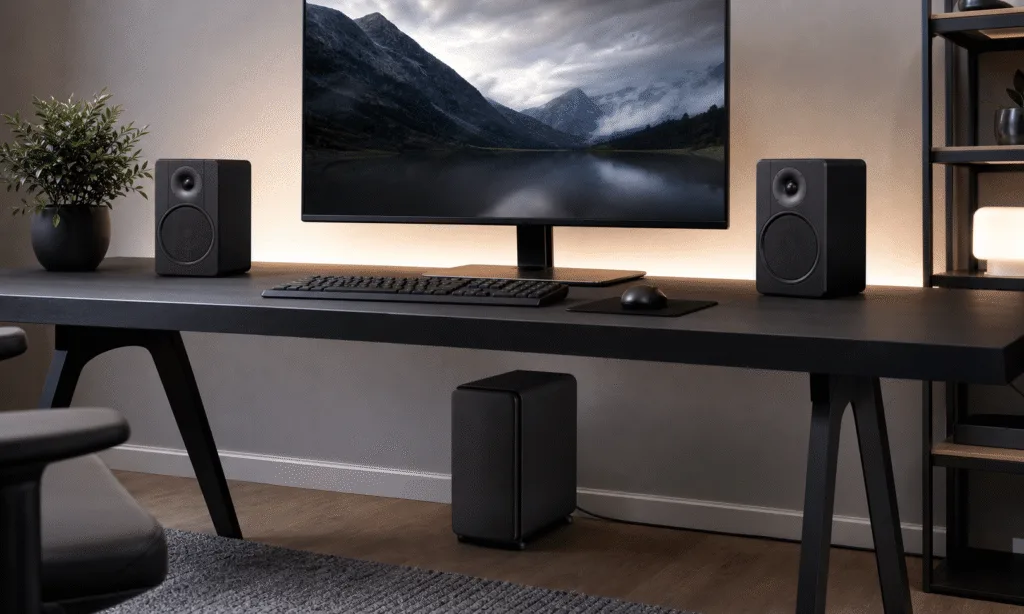
The Klipsch ProMedia Lumina is a cleaner, more modern take on the long-running ProMedia desktop speaker idea. It has a slimmer subwoofer, larger-looking satellite speakers, USB-C input, Bluetooth, app controls, and rear-facing lighting meant to fit into a current PC setup.

That sounds like a useful update. The problem is that the part most buyers expect from a 2.1 system, the subwoofer, is also the part that makes the weakest case for itself.

The Lumina can sound good. Its mids are full enough for music, games, and everyday video, and the highs avoid the sharp edge that can make cheaper desktop speakers tiring. But the bass response is too restrained for a speaker system built around a separate subwoofer. If you are buying a 2.1 set because you want clear low-end impact, this is the tradeoff that matters most.

Klipsch ProMedia Lumina

The ProMedia Lumina is the system under review, with USB-C, Bluetooth, app controls, lighting, and a slimmer subwoofer design. It fits best if the modern desktop layout matters more than heavy low-end impact.

As an Amazon Associate I earn from qualifying purchases.


Check Price on Amazon

Verdict

The ProMedia Lumina is best understood as a stylish desktop speaker system with a compact subwoofer, not as a bass-heavy upgrade for gaming or music. It makes sense for someone who wants a tidy Klipsch-branded PC speaker setup with several connection options and lighting controls, but it is harder to recommend if the main goal is powerful low-end performance.

A less expensive 2.0 speaker pair may be the smarter buy for many desks, especially if space and cable management matter. The Lumina’s subwoofer takes up less room than a traditional cube-style unit, but it also does not add as much weight or punch as a dedicated subwoofer should.

  • Best for: desktop users who want clear mids, a modern look, and multiple input options.
  • Think twice if: you want strong bass, easy cable routing, or the ability to swap in a different subwoofer.
  • Main concern: the system sounds more balanced than exciting, and the bass does not feel like the reason to buy it.

Design and Setup

The ProMedia Lumina follows the familiar 2.1 speaker layout: two left/right satellite speakers and a separate subwoofer. The system is wired, with the satellites connecting back to the subwoofer through dedicated connectors, while the subwoofer handles power and the main input hub duties.

The visual redesign is the first thing most people will notice. Instead of the older ProMedia look, the Lumina uses boxier satellite speakers with a black faux-woodgrain finish, silver-trimmed drivers, and rear lighting blocks. The styling is less obviously old-school PC speaker and more like compact bookshelf speakers adapted for a desk.

That finish is attractive from normal desk distance, but the long-term durability of the vinyl wrap is a fair concern. Klipsch’s older ProMedia systems earned much of their reputation by sticking around for years. A wrap that looks good out of the box still has to prove it can survive heat, dusting, desk bumps, and repeated handling.

The satellite speakers are not tiny. They have enough cabinet presence to look substantial on a desk, and each sits on an integrated angled stand. The tilt is useful because desktop speakers often sit below ear level, but the stands are fixed into the overall design rather than feeling like a modular placement system.

Around back, the lighting is meant to cast a glow onto the wall or desk area behind the speakers. It is not the most elaborate RGB setup in the PC speaker world, but it gives the Lumina a more current gaming-adjacent look without turning the front of the speakers into a light show.

The subwoofer is the biggest physical change from the classic ProMedia formula. Instead of a squat cube, this unit is slim and side-firing, which makes it easier to tuck next to a desk, beside a cabinet, or under a work surface. That shape is genuinely useful if floor space is tight.

The downside is that the system still requires thick speaker cables running from the satellites to the subwoofer. The cables are long enough for typical desk placement, but their thickness and proprietary-style connections make routing less flexible than it would be with slimmer, more standard wiring. If your desk setup is already cable-heavy, the Lumina will take some planning.

Controls, Inputs, and Software

The right satellite acts as the main control point. It includes physical buttons for basic operation, along with an indicator light and a rear utility control for switching sources and pairing Bluetooth. The buttons work, but they are not the most satisfying part of the system. They feel more functional than premium.

Input support is one of the Lumina’s stronger practical points. The system supports USB-C, 3.5mm auxiliary input, Bluetooth 5.3, and a headset passthrough. The left satellite also includes a USB-C charging passthrough, which is a small but useful desk convenience if you keep a phone or accessory nearby.

Feature What it means for buyers
USB-C input Useful for modern PCs, laptops, and cleaner digital desktop setups.
3.5mm AUX Keeps compatibility with older desktops, monitors, and handheld devices.
Bluetooth 5.3 Adds wireless playback for phones, tablets, and casual listening.
Headset passthrough Lets the right satellite serve as a convenient desk connection point.
Rear lighting Adds ambient glow, with limited customization through Klipsch software.

Klipsch’s companion software gives the Lumina more control than the physical buttons alone. On PC, Klipsch Control can adjust lighting presets, enable a screen-reactive lighting mode, use virtual surround, and change EQ settings. It also includes practical toggles such as night mode, auto standby, and function sounds.

The lighting is useful if you want the speakers to match a setup without needing a separate light strip, but it is not a full ecosystem-level RGB replacement. Buyers who want deep game-reactive lighting or tight synchronization with a full PC lighting setup will likely find it limited.

The EQ is more important than the lighting. Because the Lumina’s bass is restrained, the ability to adjust the sound profile helps, but it does not completely change the character of the system. Software can shape the presentation; it cannot make the slim subwoofer behave like a larger, more forceful unit.

Sound Quality

The Lumina’s best quality is its midrange. Vocals, game dialogue, synth lines, and many acoustic instruments come through with enough body to make the speakers feel more capable than basic budget desktop sets. For everyday listening, streaming video, and games, the system is clean and easy to live with.

Highs are also handled well. The speakers avoid the brittle, piercing quality that can make some compact PC speakers fatiguing at higher volumes. Bright pop tracks and sharp game effects remain controlled rather than unpleasant.

That balance makes the Lumina a good match for desk gaming in one specific sense: positional cues, footsteps, gunshots, interface sounds, and dialogue are easy to pick out. The system does not bury important detail under exaggerated bass, which can be helpful in competitive games or late-night play.

Klipsch ProMedia 2.1 THX

The ProMedia 2.1 THX is the more familiar Klipsch desktop 2.1 option, with a conventional subwoofer layout and simple wired setup. It is a better fit for readers who are specifically shopping for stronger low-end presence from a separate sub.

As an Amazon Associate I earn from qualifying purchases.


Check Price on Amazon

The problem is that a 2.1 system is supposed to add a meaningful low-end layer, and the Lumina’s subwoofer does not deliver enough of it. Even with the subwoofer turned up, bass has limited authority. It fills in some lower frequencies, but it does not bring the weight or slam many buyers associate with a separate sub.

That matters because the subwoofer is not optional in this design. The satellites connect through it, and the system is built around it. If the subwoofer does not meaningfully improve the experience, buyers are left with a larger, more cable-heavy system that behaves closer to a decent 2.0 setup than a convincing 2.1 rig.

Music exposes this most clearly. Tracks with strong mids and crisp highs sound good, but bass-forward songs lack the physical presence that should make a subwoofer worthwhile. Movies and games fare similarly. Explosions, engines, impacts, and low electronic tones are present, but they do not have the depth or pressure that would separate the Lumina from strong two-speaker alternatives.

This does not make the Lumina bad. It makes it specific. If you prefer a cleaner, less boomy desktop sound, the restrained subwoofer may not bother you. If you are expecting the classic “small speakers plus serious sub” effect, it will.

Specs and Practical Details

The source configuration includes two satellite speakers with 1-inch tweeters and 3-inch midrange drivers, plus a 6.5-inch side-firing subwoofer. The listed frequency response is 40Hz to 20,000Hz at -6dB, with a 98dB signal-to-noise ratio.

Component Listed detail
Speaker layout 2.1 system with two satellites and one subwoofer
Satellite drivers 1-inch Mylar tweeter and 3-inch midrange driver
Subwoofer 6.5-inch side-firing woofer
Inputs USB-C, 3.5mm AUX, Bluetooth 5.3
Satellite size 9.75 x 6.5 x 4 inches
Subwoofer size 14 x 13.88 x 6 inches

The dimensions explain the core tradeoff. The satellites are substantial enough to produce solid mids, while the subwoofer is designed to be easier to place than a larger box. That slimmer profile helps with space, but the listening experience suggests it also limits the kind of bass impact buyers may expect.

The cabling also deserves attention before purchase. Proprietary-style speaker connections make the system tidy from a product-control standpoint, but they limit flexibility. You cannot treat this like a standard component setup where the subwoofer can be replaced later with a third-party model.

For some buyers, that will not matter. For others, especially anyone who likes upgrading or mixing audio components, it is a reason to look elsewhere.

Who Should Buy It?

The ProMedia Lumina makes the most sense for a buyer who wants a single-box desktop speaker package with a refined look, several connection options, and enough software control to tune lighting and sound. It is also a reasonable fit for a desk where a traditional subwoofer would be too bulky.

It is less compelling for buyers who prioritize bass. The whole point of choosing a 2.1 system over a 2.0 pair is usually the added low-end response. Here, the subwoofer is slimmer and easier to place, but it does not sound forceful enough to be the system’s clear advantage.

  • Buy it if you want a modern Klipsch desktop speaker system and care more about clean mids than heavy bass.
  • Consider alternatives if you want a compact 2.0 setup that saves desk and floor space.
  • Look elsewhere if you want room-shaking bass or a more flexible component-style speaker setup.

Bottom Line

The Klipsch ProMedia Lumina is a good-looking desktop speaker system with useful inputs, app control, ambient lighting, and a more desk-friendly subwoofer shape. It sounds pleasant through the mids and highs, and it handles games, music, and movies without the harshness common to cheaper PC speakers.

But the weak bass changes the buying decision. A slim subwoofer is only a win if it still feels like a subwoofer. Here, the low end is too polite to justify the added box, thicker cables, and limited upgrade flexibility for many users.

The Lumina is not a bad speaker system. It is a cautious one: stylish, convenient, and generally good-sounding, but missing the low-end confidence that would make it an easy recommendation in the 2.1 category.

Edifier MR4

The Edifier MR4 is a practical alternative if you would rather avoid a separate subwoofer and extra floor cabling. It suits desks where balanced nearfield sound and cleaner placement matter more than sub-bass impact.

As an Amazon Associate I earn from qualifying purchases.


Check Price on Amazon

RELATED ARTICLES

LEAVE A REPLY

Please enter your comment!
Please enter your name here

- Advertisment -

Most Popular

POPULAR TAGS

- Advertisment -