


Most people never think about the ports on the back of a TV after the HDMI cables are plugged in. USB gets used for power or media, Ethernet may get a cable if Wi-Fi is weak, and everything else tends to disappear behind the stand.
One of those overlooked connections is the RS-232 serial port. On TVs that include it, this older-looking connector is not there for everyday streaming, gaming, or cable-box use. It is mainly associated with control, service, calibration, diagnostics, and professional installations. For the right buyer, though, it can be surprisingly useful.
The important caveat is that RS-232 is not a simple consumer convenience feature. It is not like plugging in a soundbar or pairing a Bluetooth remote. It is more of a control interface: useful if you are building a custom home theater, managing several displays, integrating a TV into a smart-home system, or trying to get more reliable command control than infrared or HDMI-CEC usually provides.
That makes it interesting, but also easy to overbuy for. If all you want is one TV, one streaming box, and a clean setup, RS-232 probably should not affect your buying decision. If you already use Home Assistant, Crestron-style control, Roomie Remote, or a similar automation system, it may be worth checking whether your TV supports serial control before you buy.
What is an RS-232 port on a TV?
RS-232 is a serial communication standard that has been used for decades to let devices send simple control signals to one another. On a TV, the port may appear as a 9-pin connector, a 3.5mm service-style jack that requires an adapter, or another manufacturer-specific connection. The exact shape matters less than the function: it lets a control device send commands to the display.
Depending on the TV and the manufacturer command set, RS-232 control may allow commands such as power on, power off, input selection, volume adjustment, mute, picture mode changes, or status queries. Some displays support richer control than others, and many consumer models do not expose the same level of functionality as commercial signage displays.
That last point matters. Seeing a port does not automatically mean the TV will do everything you imagine. The useful details are usually in the owner manual, service manual, installer documentation, or control protocol document. If the manufacturer does not publish the command list, the port may be far less useful to a home user.
In many cases, the RS-232 connection is associated with professional servicing, calibration, testing, or installation control. It can be used by technicians and installers to communicate with the display in a more direct way than a normal remote control. That does not mean every TV owner should use it. It means the port exists for controlled, command-based communication, and advanced users can sometimes build around that.
Why advanced users care about RS-232
The appeal of RS-232 is reliability. A traditional infrared remote has to point at the TV or an IR receiver, and the signal can be blocked by furniture, sunlight, a cabinet door, or a person standing in the way. HDMI-CEC can be convenient when it works, but many home-theater owners have seen it behave inconsistently across TVs, receivers, soundbars, consoles, and streaming boxes.
RS-232 is different. It is a wired control path. If the wiring, adapter, command syntax, and device settings are correct, the control system can send a specific command without depending on line of sight or hoping that every HDMI device interprets CEC behavior the same way.
That can be useful in situations such as:
- A dedicated home theater where the TV or projector needs to turn on, switch inputs, and match an audio system as part of one scene.
- A media room where the display is mounted in a cabinet, behind a panel, or somewhere an IR blaster is awkward.
- A smart-home setup where a hub needs predictable control over display power and input state.
- A small business, studio, waiting room, or classroom where one controller manages more than one screen.
- A troubleshooting or service workflow where the user wants to check whether the display is responding to commands.
The commercial side is where RS-232 has long made the most sense. Digital signage, conference rooms, lecture halls, control rooms, and retail displays often need repeatable control more than they need consumer-friendly setup. A system integrator can program commands once and then let a control processor handle the routine.
At home, the same idea can work, but it usually takes more effort than casual buyers expect. RS-232 is not a magic multiroom video system by itself. It is a control connection, not a replacement for HDMI distribution, network streaming, or media playback hardware.
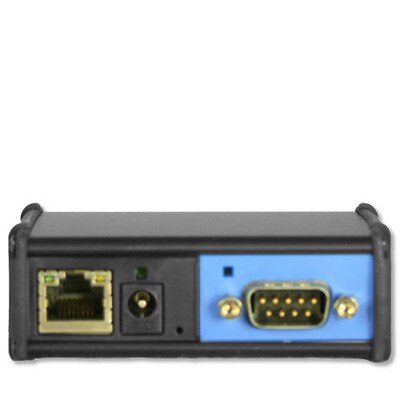
Global Caché iTach IP2SL Serial Controller
An IP-to-serial controller can let a home-theater or smart-home system send wired RS-232 commands without keeping a computer connected to the TV. Check that your display’s command protocol and connector wiring are supported before building around it.
As an Amazon Associate I earn from qualifying purchases.
What RS-232 can and cannot do
The easiest way to understand RS-232 is to separate control from content. RS-232 can tell a compatible TV what to do. It does not carry the movie, game, app, or TV channel itself.
For example, an automation system might send a command to turn on the display, switch to HDMI 2, set volume to a known level, or ask whether the display is currently on. The actual video still arrives through HDMI, a streaming app, antenna, cable box, media player, or another source.
| Use case | What RS-232 may help with | What you still need |
|---|---|---|
| Home-theater automation | Power, input, volume, and mode commands when supported | A control hub, compatible cable or adapter, and the TV command protocol |
| Multi-screen setups | Coordinated control of one or more displays | Video distribution hardware, media sources, and proper cabling |
| Commercial signage | Scheduled display control and repeatable commands | Signage players, display management tools, and installation planning |
| Diagnostics | Basic communication checks when supported by the display | A tester, computer, or service tool compatible with the TV connection |
That distinction prevents a common misunderstanding. If you want the same video playing on several TVs, RS-232 alone is not the answer. You would need a way to distribute or synchronize the video signal. An HDMI matrix, AV-over-IP system, media player network, or commercial signage platform may handle the content side. RS-232 can then be used to control the screens as part of that setup.
For a home user, that may be more equipment than the project deserves. A single-room setup can often be handled by a good universal remote, smart-home hub, or HDMI-CEC if your devices cooperate. RS-232 becomes more attractive when those simpler methods are unreliable or when the installation is complex enough to justify wired control.
Which TVs are likely to have RS-232?
RS-232 is more common on commercial displays, professional signage screens, hospitality TVs, conference-room displays, and some higher-end or installer-focused consumer models. It may also appear on certain premium TVs from major brands, though availability changes by model and region.
It is less common on budget TVs built primarily for streaming and casual living-room use. Some TVs may offer a service port that resembles a control port but is not meant for consumer automation. Others may support serial-style control through a 3.5mm connector or a special adapter rather than a full-size 9-pin connection.
Before treating RS-232 as a buying criterion, check three things:
- Whether the exact model has a documented RS-232 or serial control connection.
- Whether the manufacturer publishes a command list or control protocol.
- Whether the TV supports the specific commands you care about, such as power-on from standby or input switching.
The exact model number matters. A brand may include RS-232 on a commercial model line but omit it from a similar-looking consumer model. Even within one model family, regional variations and production-year changes can affect ports and control behavior.
If you are shopping for a TV specifically for automation, the product page is not always enough. Look for the downloadable manual, installer guide, control protocol PDF, or integration notes. If the documentation is vague, assume you may need extra research before committing.
What you need to use a TV’s RS-232 port
A basic RS-232 setup usually starts with three pieces: the TV, a controller, and the correct cable or adapter. The controller might be a computer, a smart-home hub, a home-theater control processor, or another device capable of sending serial commands.
For a simple test bench, many users start with a computer and a USB-to-serial adapter. The computer runs terminal software or a script, and the adapter connects to the TV through the right cable. From there, the user sends commands in the format required by the display.
For an installed home theater, the setup may involve a dedicated control system. That control system can combine RS-232 commands with other actions, such as turning on an AV receiver, lowering lights, selecting a source, or starting a scene.
A practical setup may require:
- A TV or display with documented RS-232 control support.
- The correct RS-232 cable, 3.5mm serial adapter, or manufacturer-specific control cable.
- A USB-to-serial adapter if you are controlling the TV from a computer.
- Control software, terminal software, or a smart-home platform that can send serial commands.
- The manufacturer command set for the exact TV or display model.
- Patience for testing baud rate, parity, stop bits, command endings, and response behavior.
Those last details are where many first-time projects slow down. Serial control depends on communication settings. If the baud rate or command format is wrong, nothing useful may happen. The TV may also require a specific standby setting before it can wake from a serial command.
Some users also add an RS-232 tester or breakout tool when troubleshooting. Simple testers can help confirm that a serial adapter is transmitting, but they do not replace the need for the right command documentation.
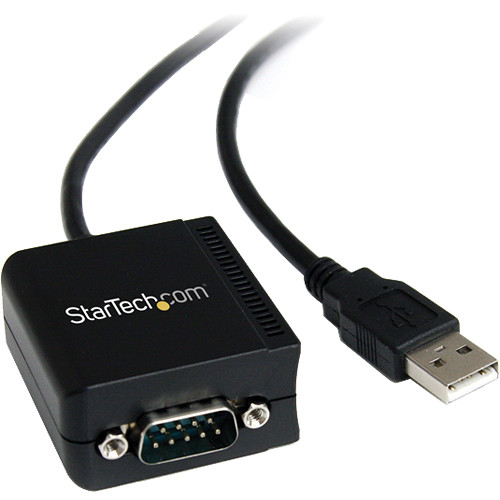
StarTech.com USB to RS-232 Serial Adapter
A USB-to-RS-232 adapter is one of the simplest ways to test whether your TV responds to serial commands. Match the adapter, cable pinout, baud rate, and command endings to the TV manufacturer’s documentation.
As an Amazon Associate I earn from qualifying purchases.
Where an HDMI matrix fits in
An HDMI matrix is sometimes discussed alongside RS-232 because both show up in more advanced AV systems. They solve different problems.
An HDMI matrix routes video and audio sources to one or more displays. For example, it may let a cable box, game console, Blu-ray player, and media PC feed several TVs. Depending on the model, it may support different numbers of inputs and outputs, such as 4×4 or 8×8.
RS-232 can be used to control a TV, and some HDMI matrix units also have RS-232 ports for external control. In that kind of setup, a controller might send commands to both the matrix and the displays. The matrix decides where the video goes; the displays respond to power, input, and other control commands.
For most homes, an 8×8 matrix is already a substantial system. It may make sense for a large house, media room network, bar area, home business, or enthusiast installation. It is probably excessive for a single living room with one TV and one receiver.
When evaluating a matrix, look beyond the number of ports. Compatibility with the video formats you use matters. So do HDMI version support, copy-protection handling, audio format support, cable distance, control options, and whether the unit can be integrated into your existing automation platform.
If the real goal is simply to stream the same app in two rooms, a matrix may not be the simplest option. Separate streaming devices, casting, or a dedicated media server may be easier. If the goal is centralized source routing with predictable display control, then a matrix plus RS-232 can start to make sense.
How hard is it to program?
The difficulty depends less on the programming language and more on the documentation. If the manufacturer publishes a clear serial command protocol, sending commands can be straightforward for someone who is comfortable with scripts, terminal tools, or home-automation configuration.
If the documentation is incomplete, proprietary, or model-specific, the project becomes more frustrating. A command that works on one TV may not work on another. Some displays require command strings with particular endings. Others send response codes that must be parsed correctly by the controller.
You do not necessarily need to write a large application. Depending on the platform, control can be handled with short scripts, an automation integration, a device driver, or a prebuilt module. Users have built serial-control projects in many common languages, including Python, C#, JavaScript, and others. The language is usually secondary to whether the TV and controller can communicate reliably.
A sensible first test looks like this:
- Confirm the TV model supports documented RS-232 commands.
- Get the correct cable or adapter for that model.
- Connect the TV to a computer or controller.
- Match the serial settings listed by the manufacturer.
- Send a harmless command, such as a status query if available.
- Test power and input commands only after basic communication works.
That staged approach saves time. If a status query fails, there is no point building a full automation scene yet. Fix the physical connection, serial settings, and command syntax first.
RS-232 versus IR, HDMI-CEC, and network control
RS-232 is not the only way to control a TV. It is one option among several, and the best choice depends on the installation.
Infrared is simple and widely supported. It is also easy to disrupt because it depends on line of sight or careful placement of an IR emitter. For visible gear in a simple room, it may be fine. For hidden equipment or repeated automation, it can be less dependable.
HDMI-CEC is convenient because it can let devices control one another through HDMI. A streaming box can wake a TV, a TV remote can adjust a soundbar, and a console can switch inputs. The problem is consistency. CEC behavior can vary by brand, device, firmware, and settings.
Network control can be powerful when the TV supports it well. Some smart TVs and professional displays can be controlled over Ethernet or Wi-Fi. That can reduce cable clutter and make integration easier in some homes. It also depends on network stability, supported APIs, authentication behavior, and whether the manufacturer keeps the feature accessible.
RS-232 is appealing because it is direct and wired. It is not always the most modern option, but in an installed system, predictability often matters more than novelty.
| Control method | Best fit | Main tradeoff |
|---|---|---|
| IR remote or blaster | Simple rooms and broad compatibility | Can be blocked or misaligned |
| HDMI-CEC | Basic device coordination over HDMI | Behavior can be inconsistent across devices |
| Network control | Smart-home systems and IP-based setups | Depends on model support and network behavior |
| RS-232 | Installed systems needing wired command control | Requires documentation, wiring, and setup knowledge |
Buyer advice: should RS-232 affect your next TV purchase?
For most buyers, RS-232 should be a secondary feature. Picture quality, panel type, brightness, contrast, gaming features, smart-TV platform, audio needs, screen size, and price will matter more. A great TV without RS-232 is still the better choice for many homes than a weaker TV that happens to include a serial port.
For a smaller group of buyers, RS-232 belongs on the checklist. That includes home-theater enthusiasts, smart-home users, installers, educators, business owners, and anyone managing displays that need to behave predictably without someone holding a remote.
RS-232 is worth prioritizing if you need:
- Reliable power and input control as part of an automation scene.
- Control of a display that is mounted where IR is inconvenient.
- Integration with an existing control system that supports serial commands.
- Repeatable behavior across a room, studio, classroom, or small business.
- A documented control path that does not depend on HDMI-CEC.
It is less important if you need:
- A normal streaming TV for one room.
- A simple setup with one remote and a soundbar.
- Multiroom video without custom wiring or source routing.
- Automation that can already be handled well by the TV platform or a smart plug.
- A budget TV where price and basic performance are the priority.
If you are buying for automation, do not stop at the port list. Confirm the command set before purchase. A documented RS-232 implementation is useful. An undocumented port may become a dead end.
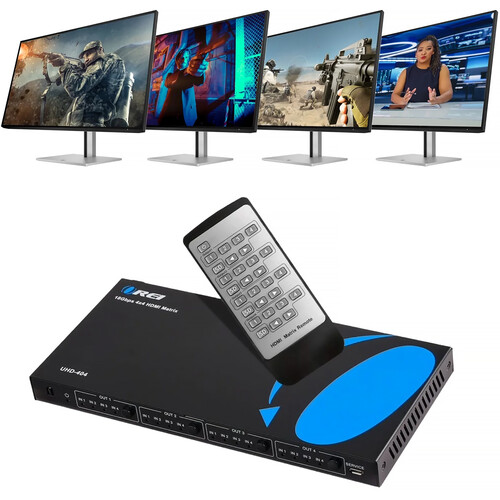
OREI UHD-404 4×4 HDMI Matrix
An HDMI matrix handles the video-routing side of a multi-screen setup, while RS-232 can handle display control when supported. Choose one based on the number of sources, number of displays, HDMI format support, and control options you actually need.
As an Amazon Associate I earn from qualifying purchases.
Verdict: useful, but only for the right setup
A TV’s RS-232 port can be a practical control tool for advanced home theaters, smart-home systems, and commercial display setups. Its main value is not that it is old or obscure. Its value is that it can provide a direct command path for users who need a TV to respond predictably.
That does not make it essential for everyone. If your TV is mainly for streaming, gaming, and casual viewing, you can safely ignore RS-232 unless you already know you need it. If you are planning a controlled room, multi-display installation, or deeper automation project, it is worth checking before you buy.
The safest way to think about RS-232 is as an installer-grade feature. In the right system, it can make control cleaner and more reliable. In the wrong system, it is just another port you will never use.