


Hermes Agent is being positioned as one of the more serious new options for people who want an AI agent running locally instead of relying entirely on cloud services. NVIDIA’s write-up frames it as a local-first, provider-agnostic agent that pairs well with RTX PCs, RTX PRO workstations and DGX Spark systems, especially when used with newer open-weight models such as Qwen 3.6.
That makes this less of a simple software announcement and more of a buying question: what kind of machine do you need if you want an agent that stays on, handles multi-step work, uses local files and improves its behavior over time?
The short answer is that Hermes looks most relevant for developers, AI enthusiasts and workstation buyers who already know they want local agentic workflows. It is not yet a simple consumer productivity app in the usual sense. The hardware decision matters because local agents are constrained by GPU memory, inference speed, model size and how much background work you expect the system to handle.
Verdict: Who Hermes on NVIDIA Hardware Is For
Hermes is best suited to users who want an always-available local agent and are willing to manage the model runtime, hardware requirements and setup choices that come with that. The appeal is clear: keep more work on-device, pair the agent with open-weight models and give it enough GPU performance to respond quickly during longer tasks.
It is a better fit for technical users than for casual buyers. If your goal is to run a chatbot occasionally, Hermes on a high-end RTX system or DGX Spark may be more hardware than you need. If your goal is to build agent workflows that read files, call tools, organize subtasks and run for long sessions, the hardware argument becomes stronger.
Based on the source material, the strongest buying cases are:
- Developers experimenting with local agents and tool-using workflows.
- AI enthusiasts who want to run open-weight models on their own machine.
- Workstation users who need sustained inference performance for repeated tasks.
- Small teams evaluating whether local AI can support internal workflows without sending every task to a cloud model.
The weaker fit is a buyer who wants a polished, low-maintenance AI assistant with no model choices, no runtime decisions and no hardware tuning. Hermes may become easier to operate over time, but the setup described here still assumes a user who is comfortable choosing a local model and runtime.
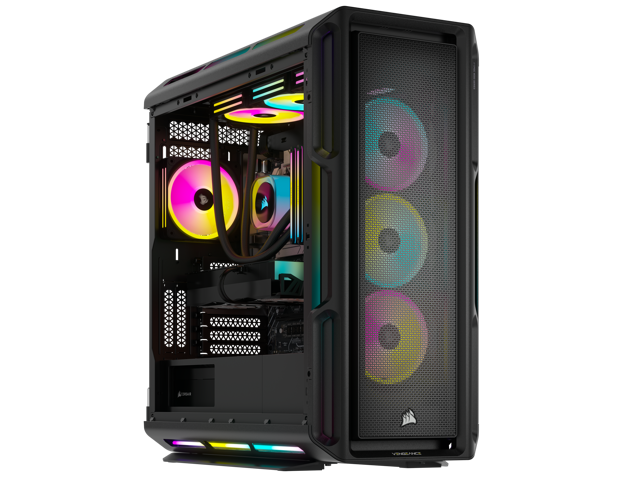
RTX 4090 Desktop PC for Local AI Experiments
A desktop with an RTX 4090-class GPU and 64GB of system memory is a practical starting point for testing Hermes, Ollama, LM Studio, and smaller or quantized local models. Check the exact GPU VRAM, power supply, cooling, and return policy before buying a prebuilt system for AI work.
As an Amazon Associate I earn from qualifying purchases.
What Hermes Claims To Bring To Local Agents
Hermes comes from Nous Research and is described as a framework designed around reliability and self-improvement. Because those claims are difficult to verify from the supplied source alone, they should be treated as positioning rather than settled fact. Still, the direction is important: Hermes is trying to compete not just as another chat interface, but as an orchestration layer for agent work.
The source highlights four areas that are meant to set Hermes apart. These should be read as the claims behind the product, not as independently proven benchmarks.
- Self-evolving skills: Hermes is described as being able to write and refine skills from complex tasks and user feedback. In practical terms, that would mean the system can preserve useful patterns instead of starting from scratch every time.
- Contained sub-agents: Hermes is said to use short-lived, isolated workers for specific subtasks, each with a narrower context and tool set. That design could help local models avoid some of the confusion that appears when a single agent tries to manage every part of a job at once.
- Curated tools and plug-ins: NVIDIA says Nous Research curates and stress-tests the skills, tools and plug-ins that ship with Hermes. That reliability claim has not been independently verified here, but it points to a real pain point in agent frameworks: integrations often fail in small, time-consuming ways.
- Framework-level orchestration: The article presents Hermes as more than a thin wrapper around a model. The claim is that orchestration, task structure and persistence help the same model perform better inside Hermes than it would in simpler frameworks.
For buyers, the key point is not whether every claim is proven in the abstract. The key point is whether the software model matches the kind of work you expect to do. A local agent that writes files, manages tasks, calls tools and stores learned routines benefits from a machine that can keep inference responsive under load.
Why NVIDIA RTX Hardware Matters Here
Hermes and the model behind it are both intended to run locally. That changes the hardware conversation. A cloud-based agent can hide the hardware decision behind a subscription. A local agent cannot. The GPU, memory capacity and sustained performance of the machine directly affect the experience.
NVIDIA’s argument is that RTX GPUs are well suited to this workload because Tensor Cores can accelerate inference and reduce latency. In plain terms, the system should feel better when the model can produce tokens quickly and keep up with multi-step agent work. A slow local model can make an agent feel broken even when the agent logic is sound.
The source names three hardware tiers:
| Hardware option | Best fit | Buyer tradeoff |
|---|---|---|
| NVIDIA RTX PC | Local AI enthusiasts and developers starting with agent workflows | More accessible than a dedicated AI system, but practical limits depend on the GPU and memory configuration |
| NVIDIA RTX PRO workstation | Professional users who need stronger local inference and workstation reliability | Higher cost, but more appropriate for sustained technical workloads |
| NVIDIA DGX Spark | Always-on agentic workflows and larger concurrent local AI tasks | Purpose-built for this use case, but aimed at serious buyers rather than casual users |
That makes RTX PCs the starting point, RTX PRO workstations the practical professional tier and DGX Spark the more specialized always-on option. The best choice depends less on the Hermes name and more on how much local model work you expect the machine to handle every day.
Qwen 3.6 And The Local Model Question
The source frames Qwen 3.6 as a major part of the Hermes story. It says the Qwen 3.6 27B and 35B open-weight models are suited to local agents and can run on NVIDIA RTX and DGX Spark hardware. It also says the newer models compare favorably with much larger previous-generation models, including 120B-class and 400B-class counterparts.
Those performance comparisons have not been independently verified here, so they should not be treated as confirmed benchmark results. The broader buyer takeaway is still useful: smaller models that approach the usefulness of larger ones are important for local AI because memory is often the hard limit.
NVIDIA’s article says the Qwen 3.6 35B model runs in roughly 20GB of memory, while some 120B-parameter models require more than 70GB. It also describes Qwen 3.6 27B as a dense model intended to deliver strong accuracy in a smaller footprint. Those are the kinds of claims buyers should verify against their chosen model files, quantization settings and runtime before purchasing hardware around them.
For local agent work, model choice affects several practical factors:
- Memory headroom: Larger models need more VRAM or unified memory. Quantization can reduce requirements, but it may affect quality.
- Responsiveness: Faster token generation makes an agent feel more usable during multi-step tasks.
- Concurrency: Running an agent, sub-agents and other local workloads at the same time requires extra capacity.
- Reliability under long sessions: An always-on agent needs sustained performance, not just a short benchmark burst.
Hermes supports local runtime paths such as llama.cpp, LM Studio and Ollama, according to the source. It also says LM Studio and Ollama support are included out of the box, which makes them the more approachable starting points for users who do not want to build a custom stack immediately.
DGX Spark: The Always-On Option
DGX Spark is presented as the dedicated system for buyers who want a local agent running continuously. The source describes it as a compact standalone machine with 128GB of unified memory and 1 petaflop of AI performance. It also says the system can run 120B-parameter mixture-of-experts models throughout the day.
That makes DGX Spark the most interesting option in the article for serious local AI workflows. A typical desktop can run local models, but an always-on agent changes the requirements. The machine may be responding to requests, planning tasks, executing tool calls, refining skills and handling other workloads at the same time.
The value of DGX Spark is not just peak speed. It is the combination of memory capacity, sustained operation and a form factor aimed at agentic workloads. If Hermes does become useful as a persistent local agent, the machine running it needs enough headroom to avoid turning every complex request into a waiting game.

NVIDIA DGX Spark for Always-On Local AI
DGX Spark is the closest match for buyers who want a compact, always-on local AI box rather than a general gaming desktop. Its appeal is memory capacity and sustained AI operation, so it makes the most sense when Hermes will be running long sessions or concurrent local workflows.
As an Amazon Associate I earn from qualifying purchases.
That said, DGX Spark is not the obvious first purchase for every Hermes user. A buyer should consider it when the workload is clearly continuous or when larger local models and concurrent jobs are part of the plan. For exploration, an RTX PC or RTX PRO workstation may be the more reasonable way to learn what Hermes can actually do for your workflow.
Setup Path: How A Buyer Would Start
The setup path described in the source is straightforward at a high level, though the real-world complexity depends on the runtime and model choices.
- Start with the Hermes GitHub repository.
- Choose a local model, with Qwen 3.6 presented as a strong match in the source.
- Select a runtime such as llama.cpp, LM Studio or Ollama.
- Run Hermes with the selected local model and test it against real tasks.
- Evaluate whether your hardware keeps responses fast enough for sustained use.
This is where buyers should be practical. Do not judge the setup only by whether the model launches. Test the tasks you actually care about: file access, long planning steps, tool use, repeated instructions and any workflow that requires the agent to recover from mistakes. A local agent that performs well in a short demo can still struggle when asked to manage messy, real work.
Buying Criteria: RTX PC, RTX PRO Or DGX Spark?
The best hardware choice depends on what you expect Hermes to do.
| Reader need | Most likely fit | Reason |
|---|---|---|
| Trying Hermes for local experiments | RTX PC | Good starting point for learning the software and testing smaller or quantized models |
| Using local AI as part of a daily development workflow | RTX PC or RTX PRO workstation | More GPU performance and memory headroom can make agent loops feel less sluggish |
| Running persistent local agents for long sessions | RTX PRO workstation or DGX Spark | Sustained workloads need more capacity and stability than occasional chatbot use |
| Running larger models or concurrent local AI jobs | DGX Spark | The source-backed 128GB unified memory figure is the clearest differentiator |
A good rule of thumb is to start with the workload, not the branding. If you only need occasional local inference, the dedicated always-on machine may be unnecessary. If you need a local agent to operate as part of your working environment every day, paying for more memory and sustained performance becomes easier to justify.

RTX 6000 Ada 48GB Workstation GPU
An RTX 6000 Ada 48GB card is most relevant for workstation buyers who need more VRAM than a consumer RTX card can provide. It is best considered as part of a properly cooled workstation build with enough CPU, system memory, storage, and power delivery for sustained inference work.
As an Amazon Associate I earn from qualifying purchases.
What To Watch Before Buying
Hermes is promising, but the source also leaves several questions that buyers should answer before committing to a hardware purchase.
First, verify the model sizes and memory requirements for the exact Qwen 3.6 variant and quantization you plan to run. A model described as fitting in a certain memory range may behave differently depending on runtime, context length and additional workloads.
Second, test the agent framework with your real tools. Messaging app integration, local file access and 24/7 operation are described in the source, but those capabilities have not been independently verified here. Treat them as items to test, not assumptions to build a purchasing decision around.
Third, evaluate whether Hermes’ claimed self-improvement features matter for your work. A self-evolving skill system sounds useful, but the practical value depends on whether it saves time in your actual workflows and whether you trust the routines it creates.
Finally, consider operational comfort. Local AI gives more control, but it also puts more responsibility on the user. You are choosing the model, runtime, hardware and update path. That is attractive for technical buyers and less attractive for people who want a finished cloud service.
Bottom Line
Hermes Agent on NVIDIA hardware is most compelling as a local AI workstation story. The software is being positioned around persistent, self-improving agent behavior, while NVIDIA is making the case that RTX PCs, RTX PRO workstations and DGX Spark provide the acceleration and memory needed to make that experience practical.
The strongest case is for developers and technical users who want to run agentic AI locally and are prepared to test the full stack themselves. Qwen 3.6 adds to the appeal because smaller capable models could make local agents more practical, though the performance comparisons in the source should be independently checked before they influence a major purchase.
For a buyer, the decision is simple: choose an RTX PC if you are experimenting, consider RTX PRO if local AI becomes part of your daily work, and look at DGX Spark only when always-on agents, larger models or concurrent workloads justify the dedicated hardware.