


Verdict: who the LG UltraGear 52G930B is for
The LG UltraGear 52G930B is not a casual upgrade from a 27-inch gaming monitor. It is a 51.6-inch, 5120 x 2160 curved VA display built for players who want a single-screen cockpit, a wide simulator view, or a desktop gaming setup that feels closer to a personal theater than a normal monitor.
That ambition comes with real costs. The monitor itself is expensive, and using its full 5K2K resolution at high frame rates asks a lot from the rest of the PC. A very high-end graphics card is the sensible pairing if the goal is to get close to the panel’s 240Hz ceiling in demanding games. Buyers with midrange systems can still use the screen, but they should expect to compromise on settings, frame rate, or both.
As a review sample, the 52G930B made its strongest case through scale, color accuracy, contrast, and responsiveness. It is large, bright, sharp, and unusually immersive. Its weaknesses are more practical than visual: it needs a large desk, it has no included handheld remote, and it lacks a backlight strobe option that could help smooth motion at lower frame rates.
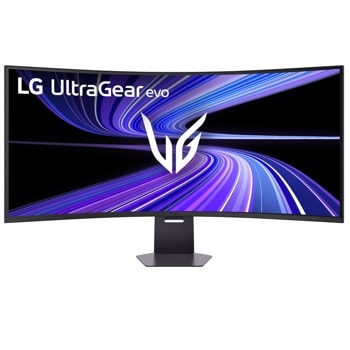
LG UltraGear 52G930B-B 52-inch 5K2K Gaming Monitor
This is the monitor reviewed here: a 51.6-inch 5K2K ultrawide built for high-end gaming rigs, simulator setups, and large single-screen desks. Check your desk depth and GPU headroom before buying, since the size and resolution are central to the experience.
As an Amazon Associate I earn from qualifying purchases.
- Best for: sim racers, flight sim players, high-end PC gamers, and users who want one very large ultrawide instead of multiple displays.
- Less ideal for: small desks, budget gaming PCs, and buyers who mostly want a compact productivity monitor.
- Main appeal: a 52-inch 5K2K, 1000R curved image with 240Hz refresh, strong contrast, and excellent factory color.
- Main caveat: the monitor’s full potential depends on expensive hardware.
LG UltraGear 52G930B specs
The 52G930B is built around a VA panel with a 21:9 aspect ratio, 5120 x 2160 resolution, 240Hz refresh rate, and a tight 1000R curve. LG lists the screen size at 51.6 inches, though it will naturally be described by most shoppers as a 52-inch monitor.
| Feature | LG UltraGear 52G930B |
|---|---|
| Screen size | 51.6 inches |
| Panel type | VA |
| Resolution | 5120 x 2160 |
| Aspect ratio | 21:9 |
| Refresh rate | 240Hz |
| Curve | 1000R |
| Response time | 1ms GtG listed |
| HDR | VESA DisplayHDR 600, HDR10 |
| Color gamut | Up to 95% DCI-P3 listed by LG; review testing measured just under that |
| Adaptive sync | VESA Adaptive Sync, AMD FreeSync Premium, G-Sync Compatible support noted in review context |
| Connectivity | DisplayPort 2.1, HDMI 2.1, USB-C, USB hub, headphone out |
| Stand adjustment | Height, tilt, swivel |
| Wall mount | 100 x 100mm VESA |
The combination is what makes the monitor unusual. Large-format screens are common in TVs, and ultrawide monitors are common on gaming desks, but a 52-inch 5K2K panel with a 240Hz refresh rate sits in a narrower class. It is meant to replace a more complex multi-monitor setup while removing the bezels that would otherwise break up a sim or racing view.
Design and setup
Physically, the 52G930B is a serious piece of equipment. With the stand attached, LG lists the width at 46.24 inches and the height range from 23.35 to 28.07 inches. That means the desk needs more than just enough space for the panel. You also need room to sit at a comfortable distance and to avoid crowding speakers, a tower, or other peripherals beside it.
The stand is built for the size of the display. It provides height, tilt, and swivel adjustments, and the monitor can also be mounted using a 100 x 100mm VESA pattern. For this type of screen, vertical positioning matters more than it does on a smaller monitor. The best experience comes when the center of the display lines up naturally with the viewer’s eye level rather than forcing the head upward or downward.
The visual design is restrained from the front. You mostly see the panel, the curve, and the bezels. Around the back, LG adds UltraGear branding and rear lighting. The lighting is more of a setup accent than a core feature, but it fits the monitor’s gaming identity without changing the buying decision.
The biggest ergonomic complaint is the missing remote. On a normal monitor, joystick-based OSD control is acceptable. On a display this large, a remote would make more sense, especially when adjusting picture modes, audio, inputs, or HDR behavior from a seated position. LG’s Switch software can help with desktop-based control in Windows, but that does not fully replace a physical remote.
Connectivity and controls
The input selection matches the monitor’s high-end positioning. DisplayPort 2.1 and HDMI 2.1 are present, and both are relevant because this monitor has a lot of pixels to move at high refresh rates. USB-C is also included, with LG listing USB-C data support and upstream functionality through that connection.
For a gaming desk, the ports are practical. You can connect a gaming PC through DisplayPort or HDMI, use USB for peripherals, and use the headphone output when you want the monitor’s DTS Headphone:X processing. The review material notes that USB-C display use is more limited than the primary DP and HDMI paths for max-refresh gaming, so PC gamers chasing the full 240Hz experience should plan around the main display inputs.
The on-screen display includes multiple game and picture modes. The default Gamer 1 mode was the standout in testing because it delivered highly accurate grayscale, gamma, and color without needing manual calibration. That matters because a monitor this expensive should not require every buyer to own calibration gear before it looks right.
The OSD also includes overdrive, crosshair options, a frame-rate counter, picture adjustment controls, PIP/PBP support, lighting controls, and user-defined joystick shortcuts. The feature list is broad, but the basics are the most important: select the right picture mode, use a sensible overdrive level, and decide whether to enable the monitor’s dimming feature for deeper blacks.

Cable Matters DisplayPort 2.1 DP80 Cable
A certified DisplayPort 2.1 DP80 cable is a sensible add-on for a monitor built around very high resolution and high refresh rates. It is most relevant for desktop PC setups using DisplayPort 2.1 rather than USB-C for gaming.
As an Amazon Associate I earn from qualifying purchases.
Image quality: sharp, bright, and color-accurate
The 5120 x 2160 resolution is central to the 52G930B’s appeal. It gives the monitor more than 11 million pixels, which helps keep the image detailed despite the huge physical size. The review sample’s pixel density was described at about 108 pixels per inch, close to what many users know from a 27-inch 1440p monitor. That is a useful comparison: the LG feels enormous, but it does not look coarse from a reasonable seating distance.
Brightness is another strength. Testing measured more than 450 nits for SDR and about 625 nits for HDR. That is more than enough for most rooms, and it gives the screen room to handle bright highlights without needing to run SDR content at uncomfortable brightness levels all day.
Contrast is where the VA panel choice pays off. The review measured native contrast a little over 4,000:1, and the Deep Black Pro dimming feature pushed measured contrast far higher in the tested scenario. It still does not behave like an OLED with per-pixel black control, but it delivers the kind of depth that makes dark scenes, space games, racing nights, and HDR content feel more convincing than they would on a typical IPS gaming monitor.
Color performance is one of the monitor’s most buyer-friendly traits. The review sample covered 94.4% of DCI-P3 and showed excellent out-of-box accuracy in Gamer 1 mode. The sRGB mode was also precise enough to make sense for users who care about standard-gamut SDR work. That gives the 52G930B a broader role than pure gaming, though its size will still shape how comfortable it is for normal productivity.
| Image test area | Review finding |
|---|---|
| SDR brightness | Over 450 nits measured |
| HDR brightness | About 625 nits measured |
| Native contrast | Over 4,000:1 measured |
| Dynamic contrast with dimming | Reported around 16,000:1 in testing |
| DCI-P3 coverage | 94.4% measured |
| Factory accuracy | Excellent in default Gamer 1 mode |
Gaming performance and GPU demands
The 52G930B’s gaming performance is the reason to consider it over a cheaper large display or TV. The monitor combines 240Hz refresh, Adaptive-Sync support, a strong overdrive implementation, and low measured input lag. In testing, it behaved more like a fast esports-grade display than its size suggests.
The review measured a 2.6ms pixel response result with Nvidia LDAT and an average input lag result of 14.3ms across 25 mouse clicks. Those figures put the monitor in strong company, especially among jumbo curved screens. More importantly, the subjective gaming experience aligned with the numbers: motion looked controlled, mouse input felt immediate, and the monitor’s scale made games feel physically larger and more enveloping.
The practical limitation is frame rate. Driving 5120 x 2160 at high settings is a heavy workload. The review context used a GeForce RTX 4090 and still described demanding games as staying below the monitor’s maximum refresh in some cases. That does not make the monitor impractical, but it does mean buyers should treat the 240Hz spec as headroom rather than a promise that every game will run there.
There is also no backlight strobe mode. That omission matters most for users whose PCs cannot keep frame rates high. At lower frame rates, a strobe feature can sometimes improve perceived motion clarity, though it often comes with brightness and VRR tradeoffs. Here, LG leans on refresh rate, overdrive, and adaptive sync instead.
- Strong point: very low lag for a screen this large.
- Strong point: effective overdrive with low visible blur in the tested fast setting.
- Tradeoff: no backlight strobe mode for lower-frame-rate motion smoothing.
- System demand: a top-tier GPU is the sensible match for high-refresh 5K2K gaming.
HDR, contrast, and color behavior
HDR on the 52G930B is better than the basic checkbox experience found on many gaming monitors. The screen supports HDR10 and carries VESA DisplayHDR 600 certification. In the review’s HDR testing, brightness exceeded the DisplayHDR 600 target on a 25% window pattern, and the dimming feature helped widen contrast.
The HDR image is not OLED-level because the panel cannot shut off individual pixels. Still, the combination of high brightness, VA contrast, and dimming gives it more punch than many LCD ultrawides. Games with bright highlights and dark environments benefit most from that mix.
HDR grayscale testing showed a cooler tint at higher brightness levels, which was the clearest color-related weakness noted in the source review. Color tracking was otherwise strong, with slight oversaturation that is common among HDR gaming monitors. For gaming and entertainment, that tends to read as extra impact rather than a serious flaw. For strict HDR mastering work, this is still a gaming monitor first.
Everyday use and productivity
A screen this large changes ordinary desktop work. Spreadsheets, timelines, web pages, and editing apps have an enormous amount of room, but the user has to manage distance and window placement. Sitting too close can make menus and toolbars at the edges feel like they require head movement. Sitting farther back makes the full canvas easier to see but reduces the close-up cockpit effect that makes the monitor so compelling for games.
The review experience found about three feet to be a comfortable gaming distance, while normal desktop tasks worked better from farther back. That will vary by desk depth, eyesight, chair position, and the applications being used. Buyers should measure their setup before assuming this monitor will fit like a normal ultrawide.
For content creation, the color performance is genuinely useful. The accurate sRGB mode and wide native gamut make the 52G930B more credible for photo, video, and design work than many gaming-first displays. The issue is not image quality; it is ergonomics. Some creators will love the wide workspace, while others may prefer two smaller monitors or a large but less aggressively curved display.
Audio and extras
Built-in monitor speakers are often forgettable, but the 52G930B does better than expected for an integrated solution. The large chassis gives the speakers more physical room, and the tight curve helps direct sound toward the person sitting in front of the screen. The review described the speakers as loud and clean, with better bass than typical monitor audio.
The headphone side is also notable. DTS Headphone:X support is included, and it is designed to create a more spatial headphone experience. Users who already rely on a dedicated gaming headset or external DAC may not care, but it is a meaningful extra for a monitor positioned as an all-in-one immersive display.
PIP and PBP support also make sense on a screen this wide. The monitor can show multiple sources, which may appeal to users who want a gaming PC and work machine connected at the same time. That said, buyers primarily interested in multitasking should think carefully about the 1000R curve. It is excellent for sitting centered in front of one enveloping image, but it is less neutral than a flat productivity display.
Pros and cons
- Pros: huge immersive 5K2K image, 240Hz refresh, low input lag, strong overdrive, high native contrast, bright HDR, excellent factory color, useful sRGB mode, strong built-in audio for a monitor, and modern connectivity.
- Cons: expensive monitor, expensive PC requirements, no included remote, no backlight strobe, large desk footprint, and ergonomics that take adjustment for everyday work.
Should you buy the LG UltraGear 52G930B?
You should consider the LG UltraGear 52G930B if you are building a premium gaming setup around immersion and you already have, or plan to buy, the graphics hardware needed for high-resolution gaming. It is especially compelling for racing, flight, space, and open-world games where a wide, tall, curved view adds to the experience.
It also makes sense if you want to replace a multi-monitor gaming setup with one continuous panel. Removing bezels can make a simulator feel cleaner, and the 21:9 format gives more vertical space than many super-ultrawide alternatives.
You should skip it if your desk is shallow, your PC is midrange, or your main priority is conventional office productivity. The 52G930B can handle work, but it is not a quiet little office monitor. It is a specialized, high-end display that rewards the right setup and exposes the limits of the wrong one.
The bottom line: the LG UltraGear 52G930B is extreme in size, performance, and system demands. For the right buyer, that is the whole point.