


Dell’s UltraSharp 52-inch Thunderbolt Hub Monitor is not pretending to be subtle. It is enormous, expensive, highly specified, and clearly aimed at people who already know why a normal office monitor is not enough.
That matters, because this is not the kind of display most people should buy on impulse. A 52-inch 6K monitor changes the way a desk works. It asks more from your space, your computer, your mounting setup, and your budget. In return, it gives you a single uninterrupted workspace that can replace the clutter and compromises of a multi-monitor arrangement.
For the right user, that trade-off is the whole point.

Dell UltraSharp 52 Thunderbolt Hub Monitor
This is the reviewed 52-inch 6K Thunderbolt hub monitor for readers who want one large, uninterrupted productivity workspace instead of several separate displays.
As an Amazon Associate I earn from qualifying purchases.
Dell UltraSharp 52 Thunderbolt Hub Monitor: Quick Verdict
The Dell UltraSharp 52 Thunderbolt Hub Monitor is a business-first display for people who need a huge amount of usable screen space and want it in one clean, high-resolution panel. It combines a massive 52-inch canvas with a 6K resolution and built-in hub features, which makes it especially appealing for productivity-heavy desks, creative workflows, large research projects, finance-style window layouts, and anyone tired of bezels splitting up their workspace.
The appeal is easy to understand once you think of it less as a big monitor and more as a desk environment. Instead of arranging two or three displays, juggling multiple desktops, or keeping a laptop open for extra room, this gives you one wide field of work. Documents, browsers, dashboards, messaging apps, calendars, preview windows, and meeting tools can all sit in view at once.
The downside is just as obvious. This is a large, demanding display. It needs physical space, a serious desk arrangement, and a machine with enough graphics capability to drive it properly. Budget laptops and weaker desktops may not give you the full experience. Even if they connect, they may struggle with the scale and resolution.
- Best for: power users, desk-based professionals, researchers, creators, executives, analysts, and anyone replacing a multi-monitor setup.
- Not ideal for: small desks, casual users, budget machines, or buyers who mainly want a gaming display.
- Main strength: huge uninterrupted 6K workspace with useful connectivity.
- Main drawback: size, cost, and hardware demands make it a specialist purchase.
Design and First Impressions
The first thing to understand about this monitor is that 52 inches does not feel like an ordinary monitor specification once it is on a desk. On paper, it sounds large. In person, it changes the character of the entire workspace.
This is not an ultrawide in the usual sense. It does not simply stretch horizontally while cutting down vertical room. The display feels more like a very large, properly scaled monitor, which is part of why it works so well for serious productivity. You get width, but you also keep meaningful height. That makes the screen more flexible for documents, spreadsheets, browser windows, code editors, design tools, presentations, and reference material.
Dell has kept the design language fairly restrained. The panel is huge, but the monitor itself still looks like a professional UltraSharp product rather than a living-room TV awkwardly drafted into office duty. That distinction matters if this is going into a studio, executive office, home office, or shared work environment where equipment needs to look intentional.
The build feels businesslike and substantial. A monitor of this size has to inspire confidence, because any wobble or flex would be hard to ignore. The overall impression is of a serious display built for long-term desk use, assuming it is mounted or supported correctly.
The included stand is necessarily larger than what you would get with a conventional monitor. That is not a surprise, but it does mean the buyer needs to think carefully about desk depth and surface area. A large base can eat into working space quickly. A monitor arm may be an option, but only if it is rated for the weight and size of this class of display. A standard arm meant for typical large monitors should not be assumed to be enough.
Setup: Space Matters as Much as Specs
The setup process is not complicated in the way enterprise hardware can be complicated, but the physical handling is a real consideration. This is a very large monitor, and buyers should plan accordingly. Unboxing, lifting, positioning, and mounting are all easier with space and help.
Once connected, the software side should be familiar to anyone who has configured a high-resolution external display. You will need to choose the right display scaling, confirm resolution, and arrange connected devices. The exact setup time will vary depending on the computer, operating system, cables, and peripherals in use, so it is better not to assume that every desk will be ready in minutes.
The more important setup question is viewing distance. A 52-inch desktop display is only comfortable if you can sit far enough back to see the full panel without constantly turning your head. On a shallow desk, the outer edges may feel too close. On a deeper desk, or with the display mounted slightly farther back, the size makes more sense.
This is where the Dell becomes less like a monitor upgrade and more like a workspace redesign. It may replace two or three displays, a dock, extra cables, and a laptop stand, but it still needs room to breathe. If your current desk barely fits a 32-inch monitor, this is not a simple swap.
For anyone comparing the best monitors for productivity, that physical fit should be part of the buying decision from the start. Resolution and ports are only useful if the screen is comfortable to use for a full workday.
Ports and Hub Features
One of the most persuasive arguments for this monitor is that it is not just a display. The Thunderbolt hub functionality is central to the value proposition, especially for laptop users who want a cleaner desk.
A large monitor with strong connectivity can reduce the need for a separate docking station. That does not mean every buyer can remove every accessory from their setup, but the built-in hub gives the Dell a practical edge over a basic large-format display. For a desk with multiple machines, test systems, laptops, or peripherals, that can matter as much as the panel itself.
The rear port placement is tidy once everything is connected. Cables can be routed cleanly, and a finished setup can look impressively controlled for something this large. The trade-off is access. Because the panel is so wide, reaching around the side to swap a cable is not as easy as it is with a normal monitor. If the display sits close to a wall, changing connections may require more effort.
That is not a deal-breaker, but it is worth planning around. Users who often connect temporary devices may want to route an accessible cable or use the hub in a way that reduces trips behind the monitor.
In Daily Use
The strongest case for the UltraSharp 52 is not made by a spec sheet. It is made by living with a huge uninterrupted desktop.
A multi-monitor setup can be effective, but it always comes with seams. Windows belong to one display or another. Bezels interrupt layouts. Operating systems sometimes handle scaling, sleep, wake, and window placement inconsistently. A single 52-inch 6K panel avoids much of that friction.
On this display, the workspace can be arranged more fluidly. A main document can sit in the center, reference material can live to one side, messaging and calendar tools can stay visible, and a browser or meeting window can occupy another section. Nothing has to be hidden just because it does not fit on the primary screen.
The benefit is especially clear for research-heavy work. If you routinely compare documents, scan long pages, monitor dashboards, write while referencing multiple sources, or keep several project windows open, the screen gives you room to think. It is not only about having more pixels. It is about reducing the number of small interruptions caused by switching windows and hunting for the thing you just covered.
There will also be times when you do not use the whole screen. That is fine. A display this large does not have to be filled edge to edge every minute to justify itself. The comfort comes from having space available when the work calls for it.

Dell UltraSharp 40 Curved Thunderbolt Hub Monitor
For readers who like Dell’s hub-monitor approach but cannot fit a 52-inch panel, the 40-inch UltraSharp keeps the focus on high-resolution multitasking and clean Thunderbolt connectivity.
As an Amazon Associate I earn from qualifying purchases.
Productivity Compared With Ultrawide Monitors
The obvious comparison is with ultrawide monitors, especially the large curved models that already appeal to productivity users. The Dell takes a different route.
Traditional ultrawides are excellent when you want horizontal spread. They are useful for timelines, spreadsheets, multiple browser windows, and side-by-side apps. But some ultrawides do not offer the same vertical flexibility as a large high-resolution panel with a more conventional shape.
The UltraSharp 52 keeps that vertical space in play. That makes it better suited to work where height matters: editing documents, viewing full pages, reading long reports, stacking windows, using large design canvases, or keeping meeting controls and notes visible at the same time.
| Setup | Strength | Trade-off |
|---|---|---|
| Dell UltraSharp 52 Thunderbolt Hub Monitor | Huge single 6K workspace with no internal bezels | Requires significant desk space and capable hardware |
| Large ultrawide monitor | Excellent horizontal room for side-by-side apps | May offer less vertical flexibility depending on model |
| Two or three separate monitors | Flexible placement and potentially lower entry cost | Bezels, cables, docks, and OS window management can add friction |
For some buyers, multiple monitors will still make more sense. They can be cheaper, easier to move, and easier to position independently. But for users who want one clean canvas and can afford the premium, the Dell makes a convincing argument.
Performance and Hardware Demands
A display this large and sharp will quickly reveal the limits of the computer attached to it. That is one of the most important practical points in this review.
The monitor is built around a 6K experience, and weaker machines may not drive it at the preferred resolution or scaling. Some budget-friendly laptops and desktops can connect to large external monitors but still fall short when asked to handle a panel like this properly. That may show up in limited resolution options, reduced refresh behavior, sluggish window movement, or a generally compromised experience.
This does not mean every buyer needs a workstation-class tower. It does mean the monitor should be matched with a capable modern laptop or desktop, especially if the work involves multiple apps, external devices, video calls, creative tools, or high-resolution media.
The phrase laptop graphics performance becomes more than a spec-sheet detail here. If your current computer already struggles with a smaller external display, this monitor is unlikely to be forgiving.
Gaming is not the main reason to buy it. You can use a large display for games if the connected system can handle it, but this model is clearly built around productivity and business performance rather than chasing the priorities of competitive gaming monitors.
Who Should Buy It?
The UltraSharp 52 makes the most sense for people who can turn screen space directly into better work. That includes users who spend long days managing complex information, comparing materials, building presentations, editing content, coordinating meetings, analyzing dashboards, or moving between several apps at once.
It is also a strong fit for a clean laptop-first desk. A single Thunderbolt connection, a large primary display, and fewer separate desk devices can make a workstation feel much more organized. In that context, the price is easier to understand because the monitor is replacing more than just a panel.
Still, this is not a universal recommendation. It is too large and too specialized for many desks. A good 27-inch, 32-inch, or ultrawide display will be the more sensible purchase for plenty of people. The Dell is for users who already feel constrained by conventional options and know they will use the space.
- Buy it if you want one massive, uninterrupted work surface.
- Buy it if you currently rely on multiple monitors and dislike bezels, cable clutter, or window juggling.
- Buy it if your laptop or desktop can comfortably drive a 6K external display.
- Skip it if your desk is shallow, your budget is tight, or your computer is already near its graphics limits.
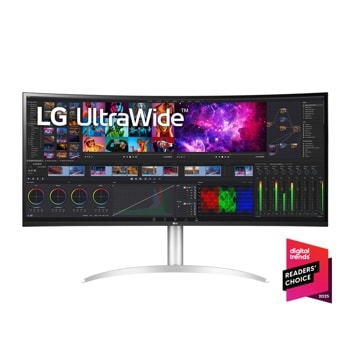
LG UltraWide 40WP95C-W
The LG UltraWide 40WP95C-W is worth considering for readers who want a premium curved Thunderbolt display but prefer a smaller 40-inch ultrawide format.
As an Amazon Associate I earn from qualifying purchases.
Final Verdict
The Dell UltraSharp 52 Thunderbolt Hub Monitor sits in a class that few desk displays can realistically occupy. It has the physical scale of a small TV, but it is designed around the priorities of a serious monitor: resolution, productivity, connectivity, and day-to-day desk use.
Its biggest strength is simple. It can make a computer feel less like a laptop attached to an external screen and more like a full command center for work. That sounds dramatic, but the practical effect is straightforward: more room, fewer interruptions, and less need to constantly rearrange the digital workspace.
The size is also the catch. You need the desk, the distance, the mounting confidence, the budget, and the graphics hardware to make it worthwhile. Without those, the Dell could become an expensive display that feels awkward rather than empowering.
For the right buyer, though, this is one of the most compelling productivity monitors available. It is not a casual upgrade. It is a serious piece of office hardware for people who can use 52 inches of 6K workspace and would rather have one enormous, clean canvas than a row of separate screens.