HomeCybersecurityDaemon Tools Backdoor: What Users and IT Teams Should Check Now

Daemon Tools Backdoor: What Users and IT Teams Should Check Now

Daemon Tools users have a concrete cleanup job in front of them after researchers reported that official installers for the disk-image mounting utility were altered to deliver malware.

Kaspersky said the compromise began on April 8, 2026, and was still active when its public analysis was released. The important detail for users is that the malicious installers were not floating around only on sketchy download sites. According to the researchers, they were distributed through the developer’s own channel and signed with the developer’s valid digital certificate.

That is what makes this kind of incident so awkward for both home users and IT teams. The normal security advice — download software only from the official source and check that it is signed — is not enough when the official supply path itself has been tampered with.

The affected DAEMON Tools builds identified by Kaspersky run from version 12.5.0.2421 through 12.5.0.2434. The technical details point to Windows versions, with malicious code placed into DAEMON Tools executables that can run again when the system starts.

For anyone who installed or updated DAEMON Tools after April 8, the safest assumption is that the machine deserves a full security review, not just a quick uninstall.

What Was Compromised

DAEMON Tools is widely used to mount disk images and emulate virtual drives. Because of what the software does, users may grant it elevated permissions during installation. That gives a compromised installer more room to operate than an ordinary desktop app.

Kaspersky reported that attackers altered DAEMON Tools components installed in the main application directory. The affected executable files named in the analysis include DTHelper.exe, DiscSoftBusServiceLite.exe, and DTShellHlp.exe.

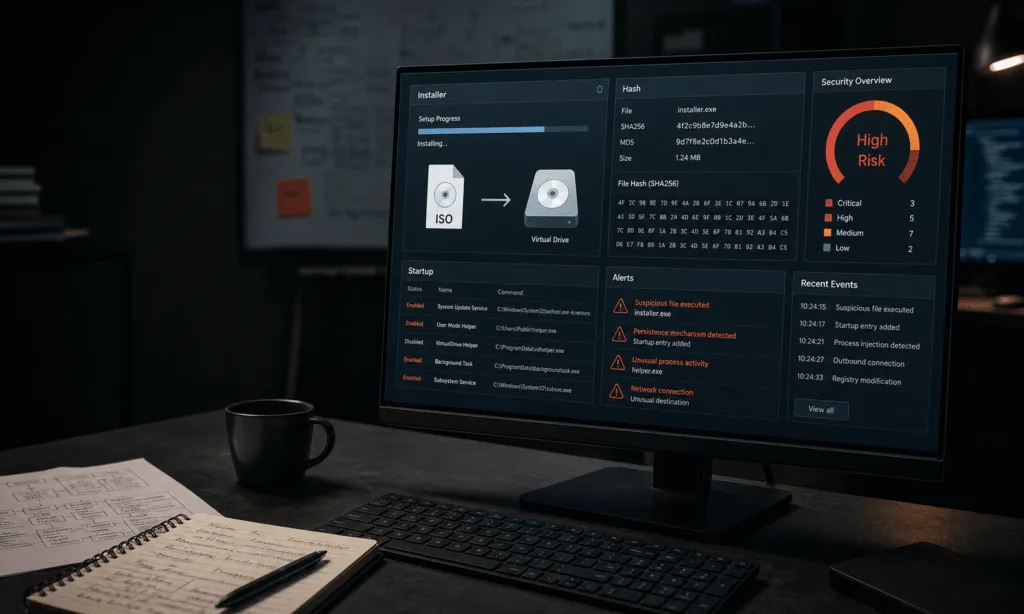
Once installed, the malicious component was designed to run at system startup and contact attacker-controlled infrastructure. The first-stage payload collected basic system and environment details, including MAC addresses, hostnames, DNS domain names, running processes, installed software, and locale information.

That type of data collection is useful for triage. Attackers can use it to decide whether an infected machine is a low-value home computer, a corporate endpoint, a research system, or part of a government or manufacturing network. In other words, the first stage appears to have helped the attackers sort victims before deciding where to push heavier tools.

Kaspersky said it saw thousands of attempted infections across roughly 100 countries and territories. The company’s visibility comes from its own telemetry, so the numbers should be read as a window into the attack rather than a complete global count.

The affected systems were reported most often in Russia, Brazil, Turkey, Spain, Germany, France, Italy, and China. Kaspersky’s telemetry also suggests that only a minority of the affected systems were in business or organizational environments, with home users making up most detections.

Malwarebytes Premium Security

A dedicated malware scanner can help home users check a Windows PC after installing an affected DAEMON Tools build. Use it as part of a broader cleanup process, not as proof that no follow-on activity occurred.

As an Amazon Associate I earn from qualifying purchases.


Check Price on Amazon

That split matters for buyers and administrators. A home user may be deciding whether to wipe a single PC or run a deeper scan. A business has a different problem: finding every endpoint that installed the affected versions, checking whether any of those systems received a second-stage payload, and reviewing activity since April 8.

Why This Attack Is Hard to Spot

Supply-chain attacks are difficult because they turn trusted delivery channels into the infection path. Users are not necessarily tricked into clicking an obvious phishing link or downloading a cracked installer. They can be compromised by doing what they normally do: install or update a familiar program from its official source.

That pattern has shown up before in high-profile incidents involving CCleaner in 2017, SolarWinds software in 2020, and the 3CX desktop client in 2023. Those cases differed in detail and impact, but the uncomfortable lesson is similar. Once attackers get into the software build, signing, or distribution process, downstream users may receive malware that looks legitimate.

In the DAEMON Tools case, the signature detail is especially important. Signed binaries often receive more trust from users, administrators, and security tools. A valid signature does not prove the code is clean; it proves only that the file was signed by a certificate that appears to belong to the expected publisher.

Kaspersky described the DAEMON Tools compromise as sophisticated and noted that it took about a month to detect. That timeline is not unusual for a supply-chain incident. The malware may not behave loudly on every machine, and the attackers may reserve the most obvious activity for a small set of targets.

For organizations, the practical takeaway is that software inventory and endpoint logs matter. If a security team cannot quickly answer which DAEMON Tools versions are installed and when they appeared, the investigation starts with asset discovery rather than malware analysis.

What the Malware Did After Installation

The first payload appears to have been an information collector. It gathered system details and sent them out to command-and-control infrastructure. On many infected systems, that may have been the only observed activity.

Kaspersky said a much smaller number of machines received follow-on malware. The company described one of those tools as a minimal backdoor capable of executing commands, downloading files, and running shellcode in memory. Running code in memory can make detection harder because fewer obvious files may be left behind on disk.

The researchers also reported a more complex backdoor called QUIC RAT on one machine at an educational institution in Russia. Their initial analysis found that it could inject payloads into legitimate Windows processes, including notepad.exe and conhost.exe, and communicate using several protocols.

The limited deployment of the later-stage backdoors is the part that points toward selective targeting. Kaspersky said the deeper infections it observed affected only about a dozen machines in government, scientific, manufacturing, and retail organizations in Russia, Belarus, and Thailand.

That does not mean other users can ignore the incident. It means the attacker’s workflow may have been staged: compromise broadly, collect machine details, then decide where to spend more effort.

For a home user, the main concern is whether the system has been profiled and whether credentials, browser sessions, or local files could have been exposed later. For a business, the bigger concern is whether one infected endpoint became a doorway into a wider network.

Affected Versions and Files to Review

The affected DAEMON Tools versions named by Kaspersky are:

  • 12.5.0.2421
  • 12.5.0.2434
  • Versions in between those builds

The DAEMON Tools files specifically identified as tampered with are:

  • DTHelper.exe
  • DiscSoftBusServiceLite.exe
  • DTShellHlp.exe

Windows users who installed or updated DAEMON Tools on or after April 8 should check the installed version, review whether those files are present, and run a full scan with reputable endpoint security software. In a managed environment, administrators should search endpoint inventory for the affected version range rather than relying on users to self-report.

Norton 360 Deluxe

A full security suite can be useful after the immediate cleanup, especially for households with several Windows PCs or mobile devices. It should be paired with password changes and a review of suspicious startup or network activity.

As an Amazon Associate I earn from qualifying purchases.


Check Price on Amazon

Uninstalling DAEMON Tools may remove the legitimate application, but it should not be treated as proof that the machine is clean. If follow-on malware ran, there may be other persistence mechanisms, downloaded files, injected processes, or credentials that need attention.

What Users Should Do Now

The response depends on the type of system involved. A personal Windows PC needs a careful malware scan and review of recent activity. A business system needs a fuller incident-response workflow.

At a minimum, users and administrators should:

  1. Check whether DAEMON Tools is installed.
  2. Confirm the installed version number.
  3. Identify whether the system installed or updated DAEMON Tools on or after April 8, 2026.
  4. Run a full antivirus or endpoint detection scan, not only a quick scan.
  5. Review startup items, scheduled tasks, and recently created files in user-writable directories such as Temp, AppData, and Public.
  6. Look for suspicious code injection into normal Windows processes, especially notepad.exe and conhost.exe.
  7. Review outbound network activity from the affected period where logs are available.
  8. Change passwords from a clean device if the affected machine handled important accounts.

For companies, the first step should be scoping. Find every endpoint with DAEMON Tools installed, separate affected builds from unaffected ones, and preserve logs before cleanup removes useful evidence. Systems in sensitive roles should be treated more carefully than ordinary workstations.

If an affected machine belongs to a government, research, manufacturing, retail, or other high-value environment, the safer move is to assume the first-stage malware may have been used for target selection. That means checking for second-stage payloads, unusual process behavior, and lateral movement rather than stopping after the original installer is removed.

What Buyers Should Consider Before Reinstalling

This incident is also a reminder to review whether DAEMON Tools is still needed on every system where it is installed. Disk-image mounting is built into modern Windows for many common formats, and some organizations may find that only a small group of users still requires a dedicated virtual drive utility.

That does not mean every third-party disk tool is unsafe. It does mean software with low-level system access should be justified, inventoried, and updated through a controlled process. Consumer utilities that linger on business endpoints for years can become unnecessary risk.

Before reinstalling or replacing DAEMON Tools, buyers should ask a few practical questions:

  • Does the user need advanced disk emulation, or only basic ISO mounting?
  • Can the required workflow be handled with built-in Windows features?
  • Does the organization have a trusted software deployment process for this category?
  • Will endpoint security tools monitor the application after installation?
  • Is there a clean installer from a verified, remediated source?

Acronis True Image

If a system may need to be rebuilt or restored from a known-good state, disk imaging and backup software can help preserve important files and recovery options. Keep backups separate from the system being investigated.

As an Amazon Associate I earn from qualifying purchases.


Check Price on Amazon

For businesses, the best replacement decision may be no replacement at all. Removing unused utilities reduces patching work and lowers the number of software supply chains the organization depends on.

The Bottom Line

The DAEMON Tools backdoor is serious because it reportedly used official distribution channels and valid developer signing. That combination can defeat the habits users normally rely on to avoid malware.

The known affected versions are 12.5.0.2421 through 12.5.0.2434, with activity tied to installations beginning April 8, 2026. Users should scan affected machines, check for unusual startup and process behavior, and treat the incident as more than a bad installer.

For IT teams, this is an inventory and investigation problem first. Find the exposed systems, review what happened after installation, and verify that no second-stage tools were deployed. The machines that look quiet may still matter, because the first-stage payload appears designed to help attackers decide which systems deserved more attention.

RELATED ARTICLES

LEAVE A REPLY

Please enter your comment!
Please enter your name here

- Advertisment -

Most Popular

POPULAR TAGS

- Advertisment -