


Free streaming has become a serious part of the cord-cutting conversation. The Roku Channel, Tubi, Pluto TV, Samsung TV Plus, and similar ad-supported services all compete for viewers who want something to watch without adding another monthly bill.
Plex belongs in that group, even though many people still associate it first with personal media libraries. Its free streaming side has grown into a useful option for anyone willing to watch ads in exchange for live channels and on-demand titles.
The latest update adds 13 free live TV channels to Plex’s lineup. For viewers trying to stretch their entertainment budget, the practical question is not just what changed, but whether Plex is worth keeping next to the other free apps already on your TV.
What Plex Just Added
Plex’s newest channel additions lean heavily into familiar FAST categories: library movies, genre TV, lifestyle programming, science, food, and niche entertainment. The list includes several Warner Bros.-branded channels, which gives the update a bit more weight than a random batch of filler streams.
The 13 new free channels are:
- Generation Drama by WBtv
- Classic Cinema by WBtv
- Survive or Die by WBtv
- Medical Incredible by WBtv
- Space & Beyond by WBtv
- The Prog G Channel
- Popular Science
- Ghosts Are Real by WBtv
- Cosmic Frontiers
- Garden by Monty Don
- Home Cooking on the Food Channel
- Complex TV
- Out Movies
The strongest additions, at least on paper, are the ones with clear viewing lanes. Classic Cinema by WBtv is aimed at older-movie browsing, Space & Beyond by WBtv gives sci-fi fans another always-on option, and Home Cooking on the Food Channel fits the kind of low-friction background viewing that works well on FAST platforms.
That matters because free live TV apps can feel crowded fast. A big channel count is useful only if the guide has channels you can understand at a glance. Plex’s new batch is not just one genre repeated 13 times, which makes it easier to see where each channel fits.
How Plex Compares With Other Free Streaming Apps
Plex says its free live TV offering includes more than 600 channels, along with a large catalog of free on-demand movies and shows. That puts it in the same everyday consideration set as The Roku Channel, Tubi, and Pluto TV, especially for viewers who rotate between apps rather than treating one service as the default.
| Service | Best fit | What to watch for |
|---|---|---|
| Plex | Free live channels plus on-demand titles, especially if you also use Plex for personal media | The guide can take some searching if you are looking for a specific new channel |
| The Roku Channel | Roku owners who want a built-in free streaming hub | Most convenient when you already use Roku hardware |
| Tubi | Free on-demand movies and TV browsing | Better for choosing a title than leaving a live channel running |
| Pluto TV | Traditional channel-surfing style viewing | The experience depends heavily on whether its channel lineup matches your habits |
For buyers, the device you use still matters. Plex is available across many major TV and mobile platforms, including popular streaming boxes, smart TVs, game consoles, Android, and iOS. If you already own a Roku, Fire TV, Google TV device, Samsung TV, or LG TV, Plex is likely easy to test before spending anything on new hardware.
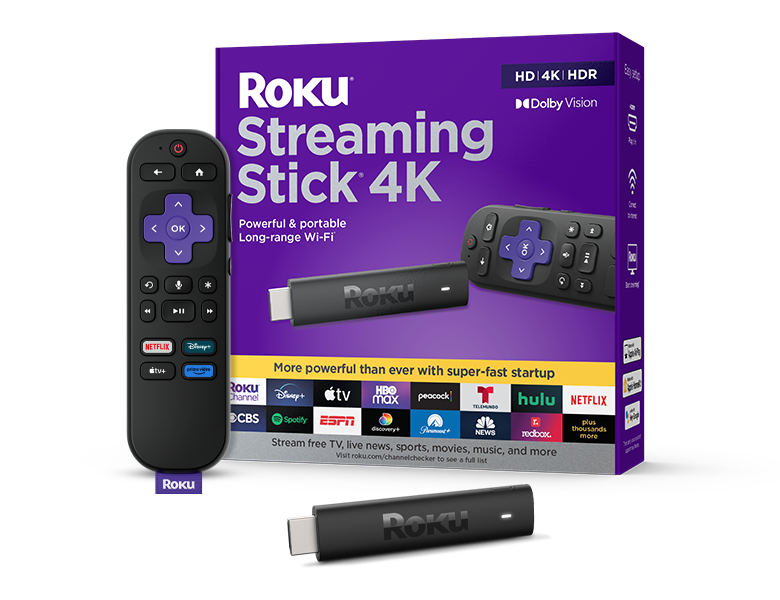
Roku Streaming Stick 4K
Roku Streaming Stick 4K is a compact way to add Plex, The Roku Channel, Tubi, Pluto TV, and other streaming apps to an HDMI-equipped TV. It is best suited for viewers who want a straightforward remote-first streaming setup.
As an Amazon Associate I earn from qualifying purchases.
How To Find The New Plex Channels
Once Plex is installed, the new channels should live in the Live TV area of the app. The fastest route is usually search, because scrolling through a 600-plus-channel guide can take longer than it should.
- Open the Plex app on your TV, streaming device, phone, or tablet.
- Go to the Live TV section.
- Use search for a specific channel name, such as Classic Cinema by WBtv or Space & Beyond by WBtv.
- If you prefer browsing, move through the live guide and look for the new channel names by category.
Plex also has free on-demand content, though menu names and placement can vary by device and app version. If you are looking for movies or shows instead of live channels, check the on-demand area of the app and look for the free viewing options rather than assuming everything is in the live guide.
Do You Need Plex Pass For This?
For the free ad-supported streaming side, Plex Pass is not the main issue. The new channels are part of Plex’s free live TV offering, so buyers comparing free streaming apps should treat Plex as a no-cost service first.
Plex Pass is a separate consideration for people who use Plex’s personal media server features and want advanced tools. Pricing around the lifetime option has been changing, so anyone considering a one-time Plex Pass purchase should check Plex’s current terms directly before buying.
That distinction is important. If you only want free live channels and on-demand movies, Plex is worth testing alongside Tubi, Pluto TV, and The Roku Channel without treating it like a subscription decision. If you run a home media server, the Plex Pass question becomes more serious because the value depends on how often you use those advanced features.

Amazon Fire TV Stick 4K Max
Fire TV Stick 4K Max works well for households already using Amazon services and still gives access to Plex and other free streaming apps. It is a practical upgrade for an older TV that has HDMI but a slow or limited smart TV interface.
As an Amazon Associate I earn from qualifying purchases.
Who Should Try Plex Now?
Plex makes the most sense for viewers who want another free app to rotate into their streaming routine. The new channels add useful variety, especially if you like classic movies, sci-fi, cooking, science, survival programming, or always-on background TV.
It is less compelling if you already feel overwhelmed by free streaming guides and mostly use one app for a specific show or movie. Plex’s strength is breadth, and that means you may need to search or browse a little before it feels personal.
Still, the buying decision is simple: if your streaming device supports Plex, the free live TV side is easy to sample. With subscription prices still pushing many households to trim paid services, another legitimate free option is worth having on the home screen.