


Microsoft is preparing to give Windows 11 laptop owners more control over the dedicated Copilot key, and the change matters more than it might sound at first.
The company says a Windows 11 update due later this year will add a setting that lets the Copilot key behave as either the Context menu key or the Right Ctrl key. That is a practical correction for newer laptops and keyboards where the Copilot key took over space that many users still expected to use for conventional keyboard work.
For anyone shopping for a Windows laptop, this makes the Copilot key less of a deal-breaker. It does not turn the key into a fully customizable button inside Windows Settings, but it should make newer keyboards easier to live with if you rely on right-side shortcuts, accessibility tools, or old muscle memory.
What Microsoft Is Changing
The dedicated Copilot key was introduced as a hardware shortcut for Microsoft’s AI assistant on Windows 11 PCs. On some laptops, that meant losing a familiar key position previously used for Right Ctrl or a menu-style shortcut key.
Microsoft now acknowledges that this created workflow problems for people who depend on those keys, including users of keyboard shortcuts and assistive technologies such as screen readers. The planned update will add a native Windows 11 setting for supported devices with a Copilot key.
The key options Microsoft has described are straightforward:
- Keep the Copilot key for launching Copilot or related Windows behavior.
- Remap it to act as the Context menu key, useful for opening right-click-style menus from the keyboard.
- Remap it to act as Right Ctrl, restoring a key position many laptop users expected before the Copilot key arrived.
That last option is the important one for a lot of buyers. Right Ctrl is not just a duplicate of Left Ctrl for everyone. Some people use it for one-handed shortcut combinations, right-side navigation shortcuts, accessibility workflows, or software-specific commands.
Why Laptop Buyers Should Care
If you are choosing between Windows 11 laptops, the keyboard layout is not a small detail. A machine can have excellent performance, battery life, and display quality, yet still feel awkward every day if a frequently used key has been replaced.
The Copilot key has been especially divisive because it is tied to Microsoft’s AI push rather than a universal keyboard need. Some users press it often. Others may never want it at all. Until Windows offers broader control, the key can feel like valuable keyboard space reserved for a feature you did not choose.

Microsoft Surface Laptop 15-inch Copilot+ PC
The Surface Laptop is a useful reference point if you want a modern Windows 11 Copilot+ machine and are checking whether the keyboard layout fits your habits. Before buying, confirm the exact processor, screen size, and return window so you can test your Right Ctrl or Context menu workflow once the remapping option is available.
As an Amazon Associate I earn from qualifying purchases.
For buyers, the upcoming remapping option reduces the risk of buying a laptop with the key. If the laptop otherwise fits your needs, you may not need to rule it out simply because it has a Copilot key. But there are still a few caveats.
The setting is expected in a future Windows 11 update, so a laptop bought today may not have the option immediately. Device support may also depend on how the keyboard reports the Copilot key to Windows. And the built-in choices, at least as described so far, are limited to a small set of functions rather than full key reassignment.
Copilot Key Options Compared
| Key behavior | Best for | Tradeoff |
|---|---|---|
| Copilot key | Users who actively use Microsoft Copilot from the keyboard | May replace a more useful traditional key position |
| Right Ctrl | Shortcut-heavy users, accessibility workflows, and one-handed right-side key combinations | Removes the dedicated AI shortcut behavior |
| Context menu key | Keyboard users who rely on right-click-style menus without a mouse | Less useful if your workflow mainly depends on Ctrl shortcuts |
This is the kind of setting that should have existed when the key first appeared. Laptop keyboards are already full of compromises, especially on thin-and-light models, and replacing a standard control key with a branded assistant shortcut was always going to frustrate some users.
Is This Enough?
The change is useful, but it is not the same as letting users assign the Copilot key to anything they want. Microsoft’s PowerToys utility includes a Keyboard Manager that can be used for broader remapping in many situations, but that still means installing and configuring an extra tool. A built-in Windows setting is simpler, especially for people who just want the key to behave like the one it replaced.
For most laptop buyers, the practical advice is simple: do not ignore the keyboard layout. If you use Right Ctrl every day, check whether the laptop has a Copilot key in that position and whether the Windows update with remapping support is available before you buy or during your return window.
If you are buying for someone who uses a screen reader, keyboard navigation, remote desktop tools, coding shortcuts, spreadsheets, or design apps, this matters even more. A missing or changed control key can slow down work in ways that spec sheets do not show.
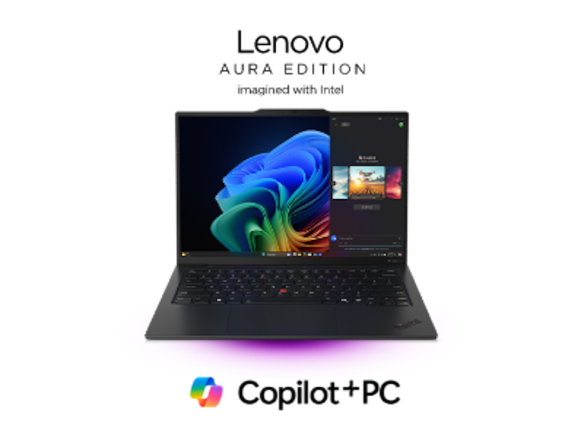
Lenovo ThinkPad X1 Carbon Gen 13 Aura Edition
The ThinkPad X1 Carbon Gen 13 Aura Edition is worth considering if the keyboard is a central part of your buying decision. It is a better contextual fit for readers who care about right-side shortcuts, navigation habits, and a business-focused laptop layout.
As an Amazon Associate I earn from qualifying purchases.
Buying Advice
A Copilot key should no longer be an automatic reason to avoid a Windows 11 laptop, but it is still worth treating as part of the keyboard decision. The best outcome is a laptop that gives you the hardware you want and, once the update arrives, the choice to make the key useful for your workflow.
Buyers who rarely touch Right Ctrl may not care. Buyers who live in keyboard shortcuts should pay close attention. Microsoft’s planned remapping option is a welcome fix, but it also underlines the bigger lesson: AI shortcuts are only helpful when they do not get in the way of the basic keys people already depend on.