Gregory Gibson reported that a Windows 11 25H2 Pro virtual machine still generated LLMNR and NetBIOS name queries during a failed hostname lookup, despite Microsoft’s 2022 plan to reduce reliance on both mechanisms. He said disabling them stopped the corresponding traffic without disrupting routine web browsing or several file-sharing connections.
A Windows NT 4 Workstation share behaved differently: Gibson reported that access failed after NetBIOS over TCP/IP was disabled and returned when it was restored. The findings concern one virtual machine and its network configuration, rather than establishing how every Windows PC behaves.
Microsoft’s 2022 transition plan
Microsoft outlined its move toward Multicast DNS, or mDNS, in April 2022. The company said maintaining older name-resolution mechanisms increased network load and expanded devices’ attack surface. It also acknowledged that real-world deployments could still depend on those mechanisms, making compatibility part of the transition.
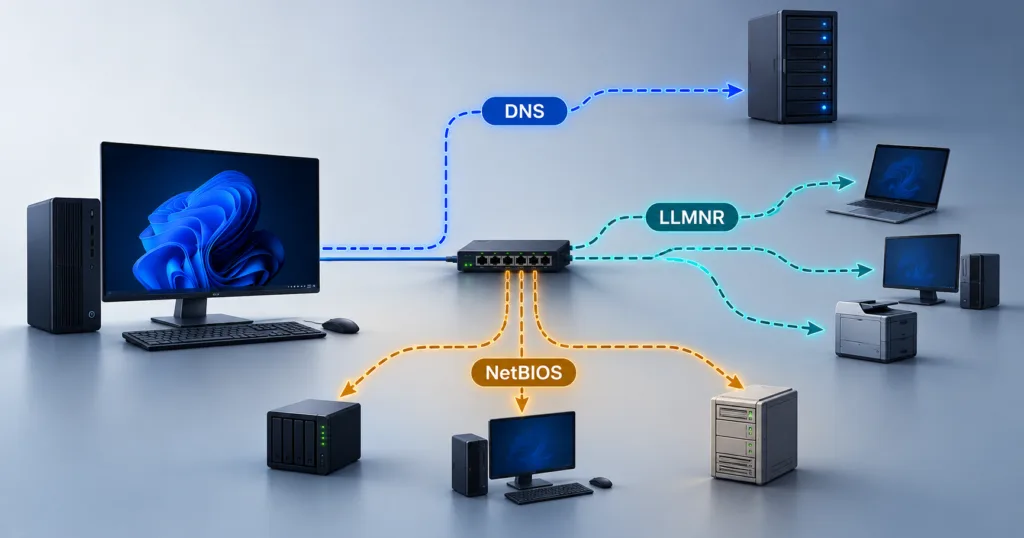
Name resolution translates a computer’s hostname into an IP address that software can use to reach it. Conventional DNS handles that task through a DNS server, but a local device’s name may not be registered there. Windows supports additional mechanisms that can help resolve names on the local network.
LLMNR, short for Link-Local Multicast Name Resolution, sends multicast queries to other devices on the same network link. Microsoft’s documentation describes it as a secondary name-resolution protocol that can operate when conventional DNS resolution is unavailable.
NetBIOS name service can use broadcast queries to seek an address for a NetBIOS name on the local subnet. Windows also supports mDNS, the mechanism Microsoft identified as the direction for local multicast name discovery.
Microsoft’s 2022 announcement described a gradual change. At the time, the company said Windows Dev and Beta Insider builds placed NetBIOS name resolution in a learning mode, using it as a fallback after mDNS and LLMNR queries failed. That announcement concerned behavior in preview builds, rather than a completed change across all Windows installations.
A failed lookup exposed local queries
Gibson described the test system as a relatively untouched Windows 11 25H2 Pro virtual machine running on Proxmox. He used Wireshark to capture traffic on its Ethernet adapter and examined what happened when Windows tried to contact a computer name that did not exist on the network.
Before changing settings, he reported that NetBIOS over TCP/IP appeared as enabled. The adapter’s NetBIOS option was set to Default, while the Group Policy setting governing LLMNR was Not Configured.
Those settings require separate interpretation. Microsoft’s policy documentation says leaving the LLMNR policy unconfigured allows LLMNR on available adapters. For NetBIOS over TCP/IP, the Default option can defer to DHCP-provided configuration; the label alone does not demonstrate that a DHCP server explicitly instructed the machine to enable it.
Gibson then attempted to ping muo-test-01. He reported three kinds of queries in the capture:
- LLMNR queries for muo-test-01.
- mDNS queries for muo-test-01.local.
- NetBIOS name queries for MUO-TEST-01.
The NetBIOS requests, he said, were sent to the subnet’s broadcast address.
The failed ping was expected because the target did not exist. The relevant observation was the reported traffic generated while Windows sought an address, showing that the older mechanisms were being invoked in that configuration.
Gibson also said the virtual machine’s network profile was Public during the capture. That observation is specific to the installation he tested and does not establish a general rule for all Windows systems using the Public profile.
Separate controls stopped the reported traffic
For the second part of the test, Gibson described enabling the Group Policy setting named “Turn off multicast name resolution.” It sits under Computer Configuration → Administrative Templates → Network → DNS Client.
Despite its broad wording, Microsoft’s documentation identifies this setting as the control for LLMNR. Enabling it disables LLMNR across the client’s available network adapters. The setting does not serve as a general switch for every multicast name-discovery mechanism, and disabling LLMNR through it does not disable mDNS.
Gibson separately changed the Ethernet adapter’s NetBIOS option from Default to “Disable NetBIOS over TCP/IP” in the WINS tab of the advanced IPv4 properties. This was an adapter configuration change alongside the LLMNR policy change.
After restarting the virtual machine, he said ipconfig /all showed NetBIOS as disabled. He then repeated the lookup and Wireshark capture using the same test conditions.
Gibson reported that DNS queries remained visible, while the LLMNR and NetBIOS queries seen previously no longer appeared. Windows still could not locate the nonexistent target, so the result concerned which mechanisms were used during the attempt, rather than a successful connection.
Windows NT exposed a compatibility dependency
Gibson reported that web browsing continued to work after both changes. His Proxmox dashboard also remained reachable through a name resolved by his local DNS server.
File sharing produced similar results in several checks. He said his SMB file server remained accessible even though it advertised a NetBIOS name, and a Windows 8 tablet’s SMB share also continued working. Those observations concern the particular connections tested, rather than every device capable of SMB file sharing.
For the Windows NT 4 Workstation experiment, Gibson said he enabled SMB1 on the Windows 11 virtual machine and restored NetBIOS over TCP/IP. He could then connect to the older machine’s shared folder and open a test file.
He reported that disabling NetBIOS over TCP/IP and restarting broke that connection. Re-enabling it and restarting restored access.
That experiment changed NetBIOS over TCP/IP support, which extends beyond name resolution, so it does not isolate hostname discovery as the sole cause of the failed connection. Microsoft’s documentation for older Windows networking also describes dependencies on NetBIOS over TCP/IP when communicating with earlier Windows NT systems.